
MERCUSYS MS110GMP manuals and product sheet
Check the hardware version on the switch, then select the matching quick installation guide or datasheet on MERCUSYS support.
Open official support (opens in a new tab)Checking which support options are available…
Who would you like help from?
Enter your name to begin your live chat with an online consultant.
What can we help you with?
Your details are used only to respond. MatzoBot requests are securely passed to the MatzoTech team.
Your request has been emailed to MatzoTech. A consultant will reply using the email address or mobile number you supplied.

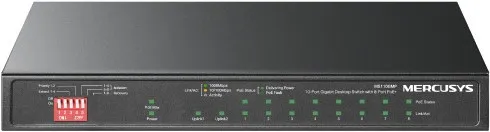
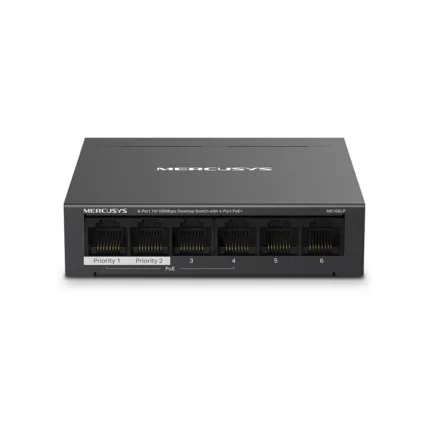
MERCUSYS MS110GMP desktop switch with eight Gigabit PoE+ ports, two Gigabit uplinks and a shared 111 W PoE budget.
R1,169.00
Supplier has stock — 1 avail
Clear fulfilment, warranty and payment details.
MERCUSYS · MS110GMP
Connect compatible cameras, access points or IP phones with one Ethernet cable per device. The MERCUSYS MS110GMP has eight Gigabit PoE+ ports for powered equipment and two data-only Gigabit uplinks for the rest of your network.
POWER AND DATA
Ports 1–8 supply data and power to compatible IEEE 802.3af or 802.3at equipment. Each port can deliver up to 30 W, within a shared 111 W budget. Add up the requirements of the devices you plan to power, then use a data-only uplink to connect to your existing network.
LONGER RUNS
For a camera or other compatible device farther from the switch, Extend Mode covers ports 1–4 and can reach up to 250 m. Those ports run at 10 Mbps in this mode. Cable type, cable quality and the device’s power draw affect the distance you can reach.
FRONT-PANEL CONTROLS
Priority Mode puts ports 1 and 2 first when traffic competes for capacity. Isolation Mode controls how selected ports can exchange traffic. PoE Auto Recovery can restart an unresponsive powered device on ports 1–8. The fanless metal enclosure fits on a desktop or wall.
| Model | MERCUSYS MS110GMP |
|---|---|
| Interfaces | 8 × 10/100/1000 Mbps RJ45 PoE+ ports and 2 × Gigabit RJ45 uplinks |
| Port negotiation | Auto-negotiation and Auto MDI/MDIX |
| Switching capacity | 20 Gbps |
| Packet forwarding rate | 14.88 Mpps |
| MAC address table | 4K entries with automatic learning and ageing |
| Forwarding | Store-and-forward |
| Jumbo frame | 16 KB |
| Flow control | IEEE 802.3x full duplex and backpressure in half duplex |
| PoE standards | IEEE 802.3af and IEEE 802.3at |
|---|---|
| PoE ports | 1–8, up to 30 W per port within a shared 111 W budget |
| Power budget conditions | MERCUSYS laboratory rating. Available power varies with connected devices and installation conditions. |
| Extend Mode | Ports 1–4, up to 250 m at 10 Mbps. Distance depends on cable type, quality and powered-device demand. |
| Priority Mode | Ports 1 and 2 |
| Isolation Mode | Front-panel isolation controls for ports 1–4 and 5–8 |
| PoE Auto Recovery | Ports 1–8 |
| Status indicators | Power, link/activity, PoE status and PoE Max |
| Enclosure | Fanless metal case with desktop or wall mounting |
|---|---|
| Dimensions (W × D × H) | 209 × 126 × 26 mm |
| External adapter output | 54 V DC, 2.22 A per MERCUSYS South Africa |
| Manufacturer test at full PoE load | 129.4 W at 220 V / 50 Hz with a 111 W connected PoE load |
| Operating temperature | −10 °C to 40 °C |
| Operating humidity | 10% to 90% RH, non-condensing |
| In the box | Switch, external power adapter and installation guide |
Check the switch label for the hardware revision before choosing a guide. Use compatible Ethernet cabling and allow for the combined power requirements of your devices.
Use official support resources for this product. Each link opens in a new tab.
Check the hardware version on the switch, then select the matching quick installation guide or datasheet on MERCUSYS support.
Open official support (opens in a new tab)Help other shoppers by sharing an honest review.
Write a reviewYou are offline. Reconnect to check prices and shop.
Reviews
There are no reviews yet.