
PXN CB1 official product and support
Exact CB1 product page with the manufacturer’s current linked manual. Select CB1 and confirm applicability before following setup instructions.
Open official support (opens in a new tab)Checking which support options are available…
Who would you like help from?
Enter your name to begin your live chat with an online consultant.
What can we help you with?
Your details are used only to respond. MatzoBot requests are securely passed to the MatzoTech team.
Your request has been emailed to MatzoTech. A consultant will reply using the email address or mobile number you supplied.

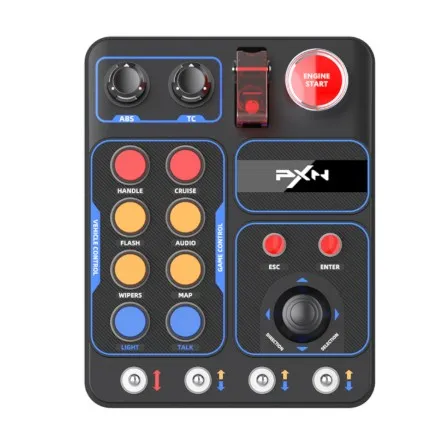
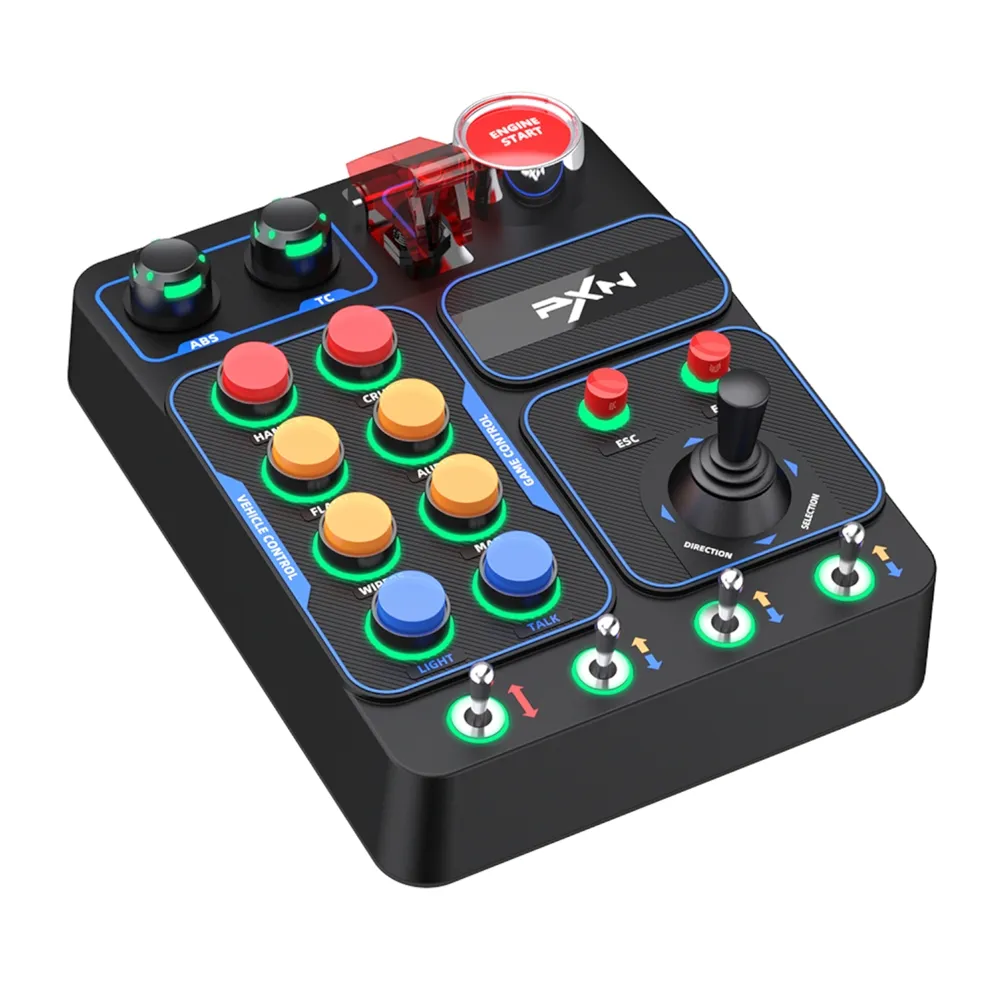
A wired PC simulation control box with 30 programmable input functions, mixed buttons and levers, seven-colour RGB lighting and a supplied desk clamp. Game mapping and compatible setup required.
R1,799.00
Out of stock
Clear fulfilment, warranty and payment details.
PXN CB1 · PC simulation controls
The PXN CB1 adds a dedicated control panel to your PC simulation setup, bringing programmable inputs, rotary knobs and tactile levers within reach. Arrange your in-game functions around the way you drive, then set the RGB lighting to suit your space.
Your command layout
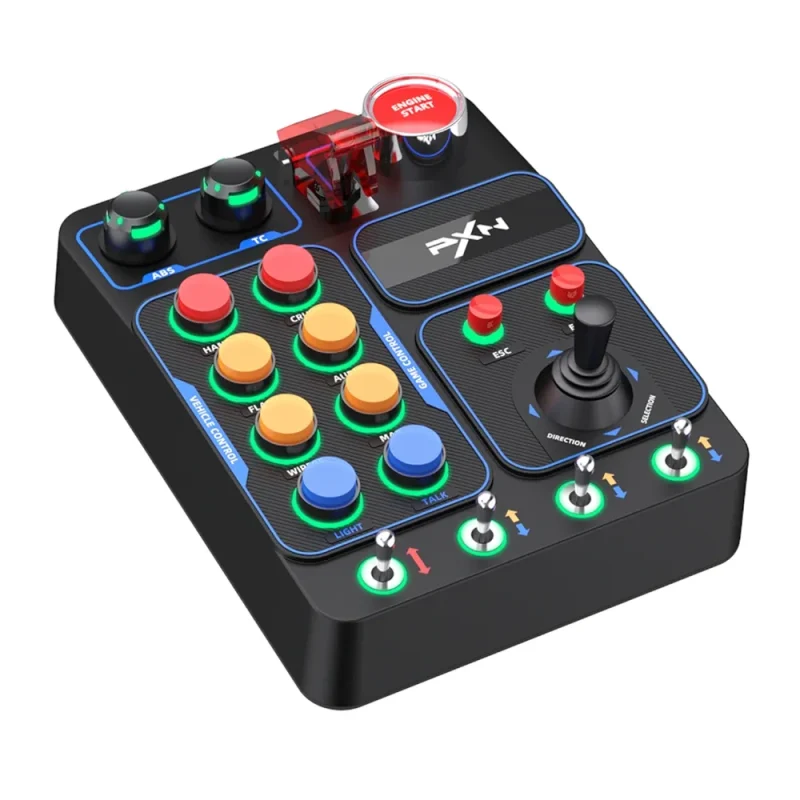
Keep lights, wipers, cruise control and other frequently used actions together beside your wheel. The CB1 brings a mixture of buttons, rotary controls, toggle levers and a directional joystick to supported PC simulators. Assign functions in your game to suit your driving routine; the printed labels are a useful starting point, while the actions available depend on the title and its control settings.
Start the session
The red covered lever and Engine Start button give ignition-related commands their own tactile controls. PXN describes a linked engine-power and start sequence, which you configure for the functions your game exposes. Six self-resetting buttons, two self-locking buttons, two rotary knobs, four metal lever controls and a directional joystick provide different ways to organise the rest of your cockpit commands.
Light the controls
Choose among seven RGB colours using the controls on the box. The manual specifies holding HANDLE while turning ABS to change colour, or turning TC to adjust brightness. A rear switch turns the lighting on or off. Additional colour-palette settings depend on a compatible PXN wheelbase connection; direct USB operation does not imply a standalone configuration app.
PC setup
Connect the CB1 directly to a PC with the supplied USB data cable. PXN lists Windows 7, 8, 10 and 11 in its manual.. ESC and ENTER map to their keyboard equivalents by default, and the manual explains how to disable or restore those mappings. Check that each command is recognised in your chosen simulator before starting a session.
A place beside the wheel
Use the supplied clamp and M5 screws for a removable desk installation on a suitable surface up to 70 mm thick. PXN also documents a 100 × 100 mm rear mounting-hole layout for compatible stands; stand accessories are sold separately. The approximately 184 × 144 × 78.5 mm housing and 540 g weight make its space requirements easy to plan before you position it.
Construction and control
The black ABS housing has a textured face and clearly grouped controls. PXN describes a multi-stage ABS manufacturing process and metal switch contact points. Keep liquids away, connect cables carefully and follow the manual’s installation and care guidance.
| Brand | PXN |
|---|---|
| Model | CB1 |
| Product type | Control button box for PC simulation games |
| Connection | Wired USB connection |
| PC operating systems listed by PXN | Windows 7 / 8 / 10 / 11; individual game and operating-system support requirements still apply |
| Console compatibility | PC product; no Xbox, PlayStation or Nintendo console compatibility claimed |
| Programmable input provision | 30 programmable button functions as described by PXN; actual mappings depend on the game and input type |
|---|---|
| Rotary knobs | 2 |
| Self-resetting buttons | 6 |
| Self-locking buttons | 2 |
| Small buttons | ESC and ENTER; keyboard mapping enabled by default and switchable as described in the manual |
| Directional control | 1 directional joystick |
| Metal lever controls | 4 |
| Ignition controls | 1 covered linkage lever and 1 Engine Start/Stop button |
| Lighting | 7 RGB colour choices with brightness adjustment and rear lighting power switch |
| Local lighting shortcuts | Hold HANDLE + turn ABS for colour; hold HANDLE + turn TC for brightness |
| Wheelbase-linked lighting | Additional colour-palette configuration requires a compatible PXN wheelbase and supported connection; do not assume support with every wheelbase |
| Housing | Black ABS with textured panel |
|---|---|
| Switch contact material | Metal contact points, as described by PXN |
| Desk mounting | Supplied clamp; manufacturer lists table thickness within 70 mm |
| Stand mounting | Manufacturer-documented rear 100 × 100 mm mounting-hole layout; compatible stand accessories purchased separately |
| Product dimensions | Approximately 184 × 144 × 78.5 mm |
| Product weight | Approximately 540 g |
| Package dimensions | Approximately 231 × 241 × 120 mm |
| Operating voltage | 5 V |
|---|---|
| Operating current | Maximum 300 mA |
| Operating temperature | 10–40 °C |
| Operating humidity | 20–80% |
| Included control box | PXN CB1 in black ×1 |
|---|---|
| Included cables | USB data cable ×1; USB-C to USB-C data cable ×1 |
| Included installation hardware | Clamp ×1; M5 screws ×3; hex wrench ×1 |
| Warranty | 12 months as listed in the existing Matzotech product data; applicable local terms and proof of purchase apply |
| Game mapping | Assign supported functions inside the game and check operation; no universal all-game or all-command guarantee |
|---|---|
| ESC / ENTER mapping toggle | Hold HANDLE and press ESC or ENTER to disable or enable that default keyboard mapping |
| Care | Keep liquids away; do not disassemble or modify; follow the official manual |
For Windows PC simulation setups. Map controls in a compatible game and confirm the mounting surface and any wheelbase connection before use. Console compatibility is not claimed.
Use official support resources for this product. Each link opens in a new tab.
Exact CB1 product page with the manufacturer’s current linked manual. Select CB1 and confirm applicability before following setup instructions.
Open official support (opens in a new tab)Official CB1 manual covering Windows PC connection, RGB controls, ESC/ENTER mapping, mounting and specifications.
Open official support (opens in a new tab)Compare 2–5 products side by side
Help other shoppers by sharing an honest review.
Write a reviewYou are offline. Reconnect to check prices and shop.

Reviews
There are no reviews yet.