Top of pagePrimary navigation
Flash sale Limited-time prices and current MatzoTech offers Shop offers

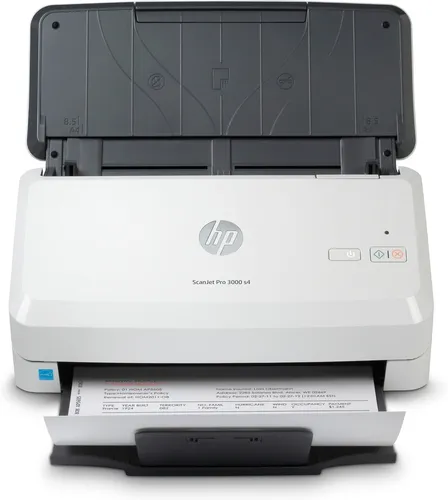
HP ScanJet Pro 3000 s4 Sheet-Feed Scanner

0.0 No reviews yet Write a review
SKU: 6FW07A
New In Stock with Supplier 2 — 7 avail

HP ScanJet Pro 3000 s4 6FW07A colour sheet-feed scanner with a 50-sheet ADF, single-pass duplex, up to 40 ppm/80 ipm at 300 dpi, USB 3.0 and 4,000-page recommended daily volume.

R8,199.00

VAT included · Secure checkout

In Stock with Supplier 2 — 7 avail

Key product details

Full specifications below
  • Upc: 193808948589
  • Gtin: 193808948589
  • Brand: Hp
  • Condition: New
Add to wishlist

Delivery & support

Clear fulfilment, warranty and payment details.

  • Availability In Stock with Supplier 2 — 7 avail In Stock with Supplier 2 — 7 avail
  • Delivery Nationwide courier delivery or collection from Strand, Cape Town. Courier nationwide or Strand collection
  • Dispatch Ships within 24 hours. Ships within 24 hours
  • Warranty Manufacturer warranty applies where stated on the product page. As stated on this page
  • Returns See our Returns Policy for eligible change-of-mind and faulty goods procedures. See Returns Policy
  • Secure payment PayFast checkout with card, Instant EFT, and Mobicred. PayFast · card · EFT · Mobicred
Ask us a question

HP • ScanJet Pro 3000 s4 • 6FW07A

Turn paper stacks into usable files.

The ScanJet Pro 3000 s4 brings single-pass, two-sided colour scanning to a compact desktop design. Load its 50-sheet automatic document feeder, choose a scan profile and capture documents at up to 40 pages or 80 images per minute at 300 dpi. HP recommends it for up to 4,000 pages per day, with USB connectivity and software tools for searchable archives.

HP ScanJet Pro 3000 s4 Sheet-Feed Scanner
40 ppmA4, up to 300 dpi
80 ipmSingle-pass duplex
50ADF sheet capacity
4,000Pages/day recommended

Single-pass capture

Scan both sides in one pass.

The feeder captures the front and back of each sheet together. HP quotes up to 40 A4 pages per minute in simplex or 80 images per minute in duplex at resolutions up to 300 ppi, in black-and-white, greyscale or colour. Higher resolution, document handling, computer performance and software can change total processing time.

Document handling

Feed everyday paperwork with care.

The 50-sheet ADF handles supported paper, business cards, cheques and plastic cards up to 1.24 mm thick. Paper support spans 40–210 g/m², with long-document scanning up to approximately 3.1 m. Remove staples before feeding previously stapled media; fragile documents require an appropriate carrier sheet. Check the mode and media requirements before loading a mixed batch.

Archive and find

Make scanned information easier to use.

HP Scan supports saved profiles and OCR workflows that create searchable PDFs or editable output. Supported file formats include PDF/A, encrypted PDF, JPEG, TIFF, PNG and common Office/text formats. Multi-feed detection and software tools such as auto-orientation, deskew and blank-page deletion help organise scans; review important output for accuracy and completeness.

Connections and software

Build a USB scanning workflow.

USB 3.0 connects the scanner to a host computer, alongside a separate rear USB-host port for a flash drive. HP lists PC and USB-drive scan destinations; follow the 3000 s4 workflow instructions. The Windows software set includes HP Scan, Scanner Tools Utility, WIA, 32/64-bit TWAIN and OpenText ISIS. HP also documents macOS and Linux options, subject to exact OS and software availability.

Resolution and desk space

Choose detail without losing the distinction.

Optical and hardware sampling reaches 600 × 600 dpi. A 1,200 ppi software output setting does not add optical sampling detail. The unit measures 300 × 172 × 154 mm closed and up to 300 × 410 × 310 mm with the working trays extended, so allow space for documents entering and leaving the feeder.

Daily use

A recommendation for sustained document work.

HP’s recommended daily volume is 4,000 pages. This is a workload guideline, not a promise that every media mix will run uninterrupted at the rated speed. The scan and power buttons keep local control simple, while roller care, appropriate loading and regular cleaning support the scanning workflow.

Specifications

Identity and scanning

Product / codeHP ScanJet Pro 3000 s4 / 6FW07A
Native UPC / HP regional mapping193808948589; official HP dynamic datasheet maps this UPC to ACQ
Scanner typeSheet-fed colour scanner; CMOS CIS; LED light source
Duplex scanningSingle-pass automatic two-sided ADF scanning
ADF capacity50 sheets
Rated A4 scan speedUp to 40 ppm simplex / 80 ipm duplex at resolutions up to 300 ppi
Speed conditions300 dpi black-and-white, greyscale and colour; actual processing varies with settings, host, software and document workflow
Recommended daily duty4,000 pages
Optical / hardware resolutionUp to 600 dpi / 600 × 600 dpi
Software output resolution75, 150, 200, 240, 300, 400, 500, 600 and 1,200 ppi; software output differs from optical sampling
Bit depth / greyscale48-bit internal; 24-bit external; 256 greyscale levels

Media handling

ADF minimum scan size50.8 × 50.8 mm; custom-media loading and mode requirements apply
ADF maximum scan size216 × 3,100 mm; long-document mode requirements apply
Custom media range in HP table50.8 × 73.6 mm to 216 × 3,099 mm; differs from minimum scan-area entry
Standard sizesA4, A5, A6, A7, A8; JIS/ISO B5; Letter, Legal and Executive
Media weight40–210 g/m²
Supported originalsCut sheets, printed or pre-punched paper, cheques, business cards, freight bills, carbonless forms and supported plastic cards
Plastic-card thicknessUp to 1.24 mm
Handling provisionsRemove staples; appropriate carrier sheet for easily damaged originals
Feed detectionMulti-feed detection sensor; advanced multi-feed detection

Connectivity and workflows

Host interfaceUSB 3.0
DestinationsHP lists PC and USB-drive scan destinations; follow the 3000 s4 workflow instructions and supported software requirements
Windows software listedHP Scan, HP Scanner Tools Utility, HP WIA driver, 32/64-bit HP TWAIN driver and OpenText ISIS
Windows TWAINVersion 2.1; 32-bit and 64-bit interfaces
Input methodsFront-panel scan; HP Scan on Windows; HP Easy Scan/ICA on documented Mac systems; third-party TWAIN/ISIS/WIA applications
File formatsPDF, PDF/A, encrypted/searchable PDF, JPEG, PNG, BMP, TIFF, Word, Excel, PowerPoint, TXT and RTF; software-dependent
Processing toolsAuto exposure/threshold/colour/size; deskew; content enhancement; background removal; multi-streaming; orientation; colour dropout; edge erase; blank-page deletion; page merge; hole fill; PDF permissions; blank-page/barcode/zonal-OCR separation
Memory / processor256 MB / ARM-1176 at 666 MHz
ControlsScan button; power button with LED; error LED
USB flash-drive portSeparate rear USB-host port for a USB flash drive, shown in HP’s 3000 s4 rear-view diagram

OS and installation

Manufacturer-documented OSWindows 11, 10, 8.1 and 7; Linux/Citrix; macOS 10.13, 10.14 and 10.15 in HP datasheet
Current OS qualificationDocumentation includes historical OS releases. Exact current driver/OS availability requires HP support-selector verification; newer macOS support not assumed
Installation resourcesUSB host and installation software/Internet access; HP lists 2 GB Windows disk space and 1 GB Mac disk space

Physical and power

Closed dimensions W × D × H300 × 172 × 154 mm
Working dimensions maximum300 × 410 × 310 mm
Weight2.7 kg
Power supplyExternal adapter; HP worldwide datasheet input 90–264 V AC, 50–60 Hz; supplied regional adapter label governs
Power consumption24 W scanning; 4.4 W ready; 1.1 W sleep; 0.1 W auto-off/off, manufacturer ratings
Operating environment10–35°C and 10–80% RH; recommended 17.5–25°C and 30–70% RH
Storage temperature−40–60°C
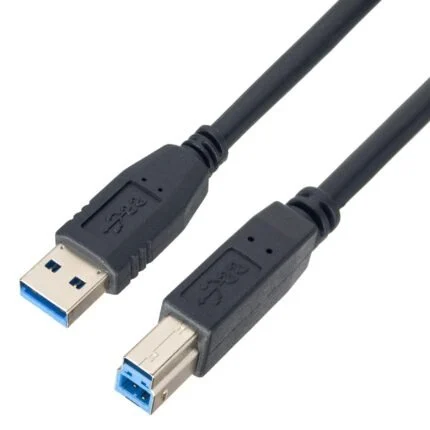
Box contentsScanner, power adapter, power cord, USB cable, flyers and installation guide
Warranty documentationHP states one-year bench limited whole-unit replacement with phone/Web support; local country terms apply

Rated speed is measured at 300 dpi and varies with the complete workflow. 600 dpi is optical; 1,200 ppi is software output. Check current OS support and the supplied regional power-adapter label before setup.

Driver & Software Downloads

Use official support resources for this product. Each link opens in a new tab.

HP ScanJet Pro 3000 s4 official product document

Manufacturer specifications and documented software information for HP 6FW07A. For driver availability, consult HP support for your exact operating-system version.

Open official support (opens in a new tab)
HP ScanJet user guide — includes 3000 s4

Official shared-model guide with a specific 3000 s4 rear-view diagram and control-panel sections. Match the 3000 s4 instructions; touchscreen and network-model procedures do not establish those features on this model.

Open official support (opens in a new tab)
No reviews yetBe the first to review this product.

Reviews

There are no reviews yet.

Be the first to review “HP ScanJet Pro 3000 s4 Sheet-Feed Scanner”

Your email address will not be published. Required fields are marked *

Compare 2–5 products side by side

WhatsApp