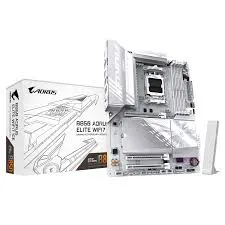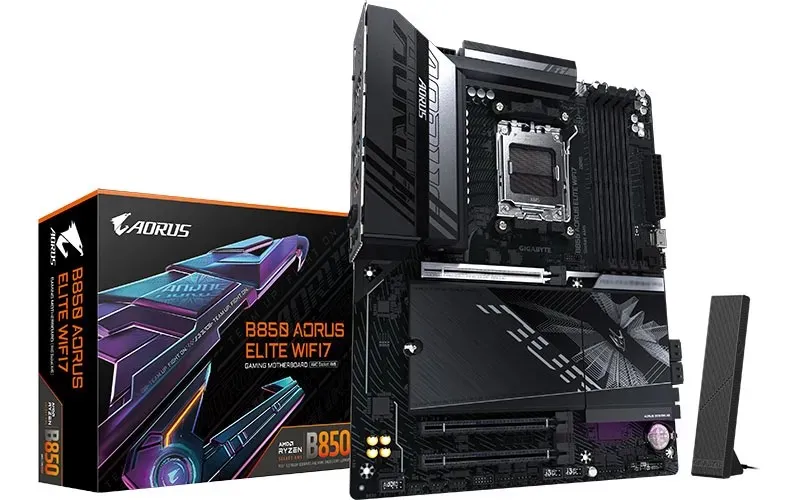
GIGABYTE B850 AORUS ELITE WIFI7 · AM5
Make room for the next part of your build.
Four DDR5 sockets, three M.2 connectors and a full ATX layout give the B850 AORUS ELITE WIFI7 a considered foundation for an AMD desktop. Plan its expansion around the exact processor: the main graphics slot and two CPU-connected SSD sockets change their supported links with the Ryzen family you choose.

PROCESSOR FOUNDATION
Start with the CPU support entry.
The AMD B850 chipset and AM5 socket support the manufacturer’s listed Ryzen 9000, 8000 and 7000 families. Match an exact processor to the required BIOS before assembly. With Ryzen 9000 or 7000, the primary slot provides PCIe 5.0 x16; Ryzen 8000 Phoenix variants use narrower PCIe 4.0 links. A family name alone does not establish the finished system’s expansion capabilities.
MEMORY POPULATION
Four sockets, with a clear starting pair.
The board lists up to 256GB across four DDR5 sockets, with 64GB per-module support subject to the CPU, firmware and qualified memory combination. The manual recommends A2 first and A2 plus B2 for a two-module installation. EXPO and XMP profiles are supported; the native 8200 reference is an overclocked MT/s data rate, rather than a guaranteed clock or result for every population.
STORAGE PATHS
Give each SSD the right connection.
Three M-key M.2 connectors accept PCIe SSDs, alongside four SATA ports. M2A_CPU can provide a PCIe 5.0 link with a suitable Ryzen 9000 or 7000 processor. M2B_CPU is PCIe 4.0, with a reduced x2 ceiling for Phoenix 2 processors, while M2C_SB connects through the chipset. These M.2 sockets do not accept SATA M.2 drives; check device fit and the exact CPU before choosing a population.
POWER AND COOLING
Build the airflow plan around the complete system.
GIGABYTE’s twin 14+2+2 power design uses a parallel 7+7 Vcore arrangement. VRM heatsinks, a heatpipe and M.2 thermal provision give the native full-metal cooling story concrete parts. Six fan/pump headers and Smart Fan 6 controls support a tailored airflow plan. Cooling results still depend on the processor, case, fans, ambient conditions and settings.
CASE AND DISPLAY CONNECTIONS
Put each port where it belongs.
The rear panel provides DisplayPort, USB-C, USB-A, 2.5GbE, antenna connections and audio. The HDMI connection is internal: GIGABYTE’s Sensor Panel Link supports a compatible case display rather than adding a rear HDMI socket. A front USB-C header provides a separate 20Gb/s reference, while rear USB-C is 10Gb/s. Processor graphics and compatible cabling remain necessary for the display outputs.
NETWORK AND AUDIO
Choose wired or wireless with the right conditions.
Realtek 2.5GbE provides the wired link. The documented RTL8922AE wireless module supports Wi-Fi 7 across listed 2.4, 5 and 6GHz bands with a 160MHz reference, but OS, regional channel rules, access point and environment determine availability. The native Bluetooth 5.4 reference is retained with revision/driver conditions. Realtek audio, two rear jacks and optical S/PDIF remain separate from those network capabilities.
ASSEMBLY DETAILS
Finish the small connections with care.
The 30.5 × 24.4cm ATX board needs matching case standoffs and clearance for the cooler, graphics card and SSD heatsinks. Front-panel, USB, audio and lighting headers support the rest of the build. PCIe and M.2 release features, the debug zone and onboard controls help with assembly and diagnosis; confirm the printed PCB revision and the guide that belongs to it.
BIOS AND SUPPORT
Keep tuning tied to the hardware.
Q-Flash and Q-Flash Plus provide exact-model firmware paths. X3D Turbo Mode is retained as a BIOS feature subject to the processor and firmware, without a promised frame-rate gain. GIGABYTE Control Center and related utilities depend on the board and operating system. Check the exact support list and procedure before selecting a resource, and keep a known-good configuration when testing optional tuning.
Reviews
There are no reviews yet.