
HP ScanJet Pro 3600 f1 user guide (PDF)
Official English HP user guide for scanner setup, supported media, software selection and troubleshooting. Check OS and driver compatibility separately.
Open official support (opens in a new tab)Checking which support options are available…
Who would you like help from?
Enter your name to begin your live chat with an online consultant.
What can we help you with?
Your details are used only to respond. MatzoBot requests are securely passed to the MatzoTech team.
Your request has been emailed to MatzoTech. A consultant will reply using the email address or mobile number you supplied.

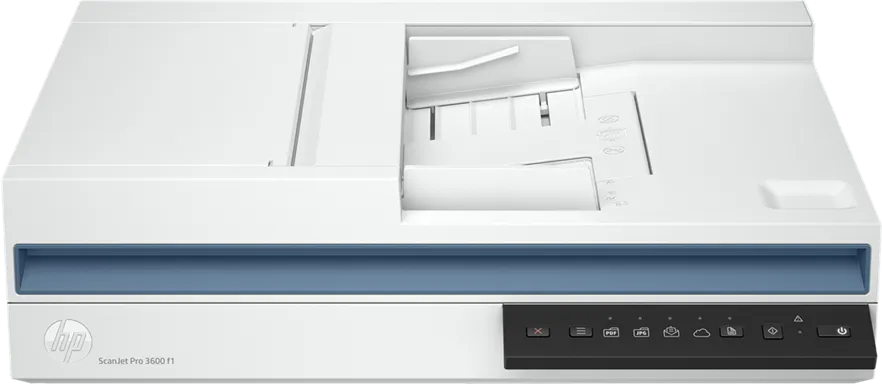
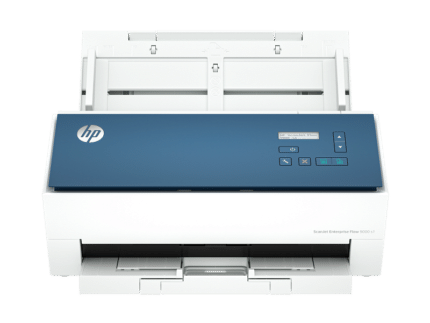
HP ScanJet Pro 3600 f1 USB scanner with a 60-sheet duplex feeder and a flatbed rated at up to 1,200 dpi optical.
R8,489.00
In Stock with Supplier 2 — 10 avail
Clear fulfilment, warranty and payment details.
Official manufacturer overview
HP Support · HP’s document-loading guide covers four ScanJet models, including the ScanJet Pro 3600 f1. The Specifications tab describes the exact 20G06A scanner.
Play to load this video from YouTube.
HP SCANJET PRO 3600 F1
Load up to 60 sheets for single-pass two-sided scanning. The flatbed gives you a separate place for a bound page or one-off original, while HP Scan can turn recurring document jobs into shortcuts.
PAPER HANDLING
At 300 dpi the feeder is rated for up to 30 pages or 60 images per minute. A multifeed sensor detects overlapped sheets, and long-page support covers documents up to 3,100 mm within the supported paper range.
FLATBED
Use the 216 × 297 mm scanning glass when feeding an original through rollers is impractical. The flatbed is rated at up to 1,200 × 1,200 dpi optically.
WORKFLOW
Supported software can save PDFs, create searchable files and send scans to configured email, folder, cloud or USB destinations. Set routing on the connected computer when the workflow requires it.
| Part number | 20G06A |
|---|---|
| Scan technology | Colour CIS with flatbed and single-pass duplex ADF |
| ADF speed | Up to 30 ppm / 60 ipm at 300 dpi in black, grey or colour |
| Optical resolution | ADF up to 600 × 600 dpi. Flatbed up to 1,200 × 1,200 dpi. |
| Daily recommended duty | Up to 3,000 pages through the ADF |
| Bit depth | 24 bit external, 48 bit internal |
| ADF capacity | 60 sheets |
|---|---|
| ADF size range | 89 × 148 to 216 × 3,100 mm |
| ADF paper weight | 49–120 g/m² |
| Flatbed area | 216 × 297 mm |
| Multifeed detection | Supported |
| Connection | USB 3.0 |
|---|---|
| Operating systems listed by HP | Windows 11/10/8.1/8/7, Windows Server and Linux. macOS 10.14 through 12 listed. Check exact version and driver availability. |
| Scan software | HP Scan and TWAIN 2.4 on supported configurations, HP Easy Scan or ICA for supported Macs |
| File types | PDF, PDF/A, searchable PDF, JPEG, PNG, TIFF, CSV, Excel, Word and TXT, subject to scan software |
| Power supply | External, 100–240 V AC input |
|---|---|
| Power consumption | 13.31 W scanning, 5.31 W ready, 1.23 W sleep |
| Operating temperature | 10–35 °C |
| Size | 491.5 × 325.4 × 133.3 mm (W × D × H) |
| Maximum size | 491.5 × 422.28 × 387.42 mm |
| Weight | 5.4 kg |
Use official support resources for this product. Each link opens in a new tab.
Official English HP user guide for scanner setup, supported media, software selection and troubleshooting. Check OS and driver compatibility separately.
Open official support (opens in a new tab)Help other shoppers by sharing an honest review.
Write a reviewYou are offline. Reconnect to check prices and shop.
Reviews
There are no reviews yet.