

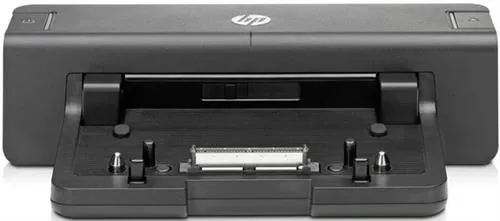
HP 230W A7E34AA Docking Station
HP A7E34AA 230 W mechanical dock for compatible HP business notebooks, with four USB 3.0 ports, DisplayPort, DVI-D, VGA and Ethernet.
R2,079.00
Supplier has stock — 1 avail
Key product details
Full specifications below- Mpn: A7E34AA
Delivery & support
Clear fulfilment, warranty and payment details.
- Availability Supplier has stock — 1 avail Supplier has stock — 1 avail
- Delivery Nationwide courier delivery or collection from Strand, Cape Town. Courier nationwide or Strand collection
- Dispatch Backorder — usually dispatched in 2–3 working days after payment verification, subject to supplier confirmation. Backorder — usually dispatched in 2–3 working days after payment verification, subject to supplier confirmation.
- Warranty Manufacturer warranty applies where stated on the product page. As stated on this page
- Returns See our Returns Policy for eligible change-of-mind and faulty goods procedures. See Returns Policy
- Secure payment PayFast checkout with card and Instant EFT, or pay by EFT. PayFast · card · EFT
HP A7E34AA | 230 W notebook dock
Keep a compatible HP notebook connected at your desk
Set an eligible HP business notebook onto the mechanical docking connector to access a monitor, Ethernet and desk peripherals. The 2012 HP A7E34AA has four USB 3.0 ports, single-link DVI-D, DisplayPort and VGA, plus connections for older desk equipment.
Notebook fit
Check the laptop’s docking connector
The A7E34AA docks through an HP mechanical connector on supported notebooks. Match the full notebook model and docking port with HP’s compatibility guide before ordering.
Monitor setup
Choose the port that fits your display
Single-link DVI-D supports up to 1920 × 1200 with reduced blanking. DisplayPort 1.2 requires a compatible notebook, dock and screen. Available display combinations depend on the notebook graphics configuration.
Desk connections
Keep wired peripherals connected
Four USB 3.0 ports handle modern USB accessories on a supported notebook. The dock also has separate line-in and headphone jacks, Ethernet and connectors for compatible older serial, parallel, keyboard and mouse peripherals.
Specifications
Identity and fit
| Manufacturer part number | HP A7E34AA |
|---|---|
| Model | HP 2012 230 W Docking Station |
| Notebook interface | Proprietary HP mechanical docking connector |
| Compatibility | Select HP business notebooks. Match the full model in the HP compatibility guide. |
Ports
| USB | 4 × USB 3.0 Type-A (three always on and one powered, per HP) |
|---|---|
| Network | 1 × RJ45 Ethernet |
| Video connectors | 1 × DisplayPort 1.2, 1 × single-link DVI-D, 1 × VGA |
| Audio | 1 × line-in, 1 × headphone jack |
| Legacy and stand | Dedicated keyboard and mouse connectors, serial port, parallel port, monitor stand port |
| Security | Supports the optional HP Docking Station Cable Lock and a standard notebook-style lock |
Power and dimensions
| Power class | 230 W |
|---|---|
| Dimensions (W × D × H) | 260 × 163.6 × 66 mm, per HP exact A7E34AA datasheet |
| Dock weight | 1.07 kg |
HP exact 2013 product datasheet takes precedence over the later combined brochure for product depth; native photograph shows the standard mechanical dock. Historical HP box listed the dock, power adapter and documentation, which do not establish what the current local offer includes.


Reviews
There are no reviews yet.