
Brother PT-D210 user manuals
Official Brother South Africa manuals for installing a cassette, creating labels and troubleshooting the PT-D210.
Open official support (opens in a new tab)Checking which support options are available…
Who would you like help from?
Enter your name to begin your live chat with an online consultant.
What can we help you with?
Your details are used only to respond. MatzoBot requests are securely passed to the MatzoTech team.
Your request has been emailed to MatzoTech. A consultant will reply using the email address or mobile number you supplied.

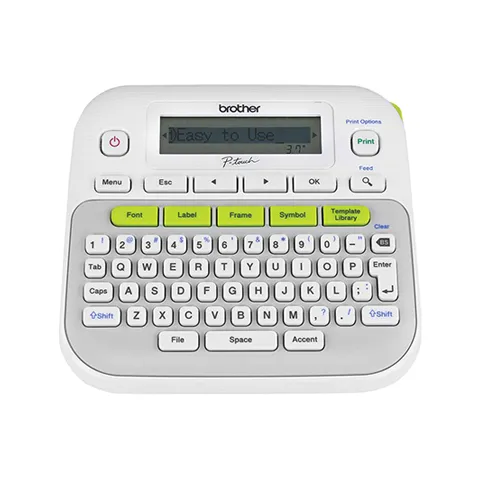
Brother PT-D210 standalone label printer for 6, 9 and 12 mm TZe tape, with a preview display and manual cutter.
R1,529.00
Supplier has stock — 3 avail
Clear fulfilment, warranty and payment details.
Official manufacturer overview
Brother South Africa · Brother South Africa demonstrates the standalone PT-D210 and examples of TZe labels. Select tape by the device’s supported width.
Play to load this video from YouTube.
BROTHER · PT-D210
Create labels on the Brother PT-D210 with its built-in keyboard, preview screen and manual cutter. Choose a 6, 9 or 12 mm TZe cassette to fit the space you are labelling, then use up to two lines of print on suitable tape.
DESKTOP LABELLING
Use a narrow cassette for the side of a drawer or a wider cassette for a short title and reference number. Preview the result before printing.
DESIGN SHORTCUTS
The PT-D210 gives you built-in fonts, symbols and templates for office labels and small decorative projects. Cut the tape with the manual cutter once the label prints.
POWER AND MEDIA
Use six AAA batteries for portable use or the optional Brother AD-24ES adapter at a desk. The South African box includes a 4 m black-on-white laminated starter cassette.
| Model | Brother P-touch PT-D210 |
|---|---|
| Functions | Standalone label printing |
| Tape family and widths | Brother TZe, 6 mm, 9 mm or 12 mm |
| Print resolution | 180 dpi |
| Rated print speed | Up to 20 mm/s |
| Printed lines | Up to 2, depending on tape width |
| Cutter | Manual |
| Keyboard | QWERTY |
|---|---|
| Display | 16-character graphic display with preview |
| Design tools | Built-in templates, fonts, frames and symbols |
| Connectivity | Standalone operation from built-in controls |
| Dimensions (W × D × H) | 157 × 149 × 68 mm |
|---|---|
| Weight | Approximately 0.49 kg |
| Power | Six AAA batteries or optional Brother AD-24ES AC adapter. Both are sold separately. |
| Included media | 12 mm black-on-white laminated TZe starter tape, 4 m |
| Other box contents | PT-D210 and user guide |
Check the TZe tape width for the space you need to label.
Use official support resources for this product. Each link opens in a new tab.
Official Brother South Africa manuals for installing a cassette, creating labels and troubleshooting the PT-D210.
Open official support (opens in a new tab)Help other shoppers by sharing an honest review.
Write a reviewYou are offline. Reconnect to check prices and shop.


Reviews
There are no reviews yet.