

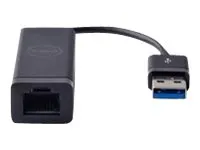
Dell Adapter – USB 3 to Ethernet (PXE)
Dell 470-ABBT USB-A to Gigabit Ethernet adapter with one RJ45 port and PXE support on compatible systems.
R559.00
Supplier has stock — 10 avail
Key product details
Full specifications below- Mpn: 470-ABBT
- Brand: Dell
Delivery & support
Clear fulfilment, warranty and payment details.
- Availability Supplier has stock — 10 avail Supplier has stock — 10 avail
- Delivery Nationwide courier delivery or collection from Strand, Cape Town. Courier nationwide or Strand collection
- Dispatch Backorder — usually dispatched in 2–3 working days after payment verification, subject to supplier confirmation. Backorder — usually dispatched in 2–3 working days after payment verification, subject to supplier confirmation.
- Warranty Manufacturer warranty applies where stated on the product page. As stated on this page
- Returns See our Returns Policy for eligible change-of-mind and faulty goods procedures. See Returns Policy
- Secure payment PayFast checkout with card, Instant EFT, and Mobicred. PayFast · card · EFT · Mobicred
Dell 470-ABBT · USB-A to Gigabit Ethernet adapter
Add a wired network port through USB-A
Connect a standard Ethernet cable to a computer with a USB-A port using this compact Dell network adapter. Compatible Dell systems can also use it to start from the network when PXE boot has been configured.
At the desk
Connect a cable when the computer has no RJ45 socket
Plug the adapter into USB-A and connect a suitable Ethernet cable to a network port. The wired link can negotiate at 10, 100 or 1,000 Mbps depending on what it is connected to.
Network deployment
Check PXE before setting up an installation
The adapter supports PXE on compatible systems. Network boot requires firmware support on the computer and an appropriate network boot service. Check the computer’s manual and firmware settings for that exact model.
Specifications
Product identity
| Dell order code | 470-ABBT |
|---|---|
| Dell part number | 94HCF |
| Host connector | USB 3.0 Type-A |
| Network port | One RJ45 port for 10/100/1000 Mbps Ethernet |
Setup and size
| Network boot | PXE on systems with compatible firmware and configuration |
|---|---|
| Dimensions | 152 × 20.3 × 15.2 mm (L × W × H) |
Check for a USB-A port and confirm compatible firmware if using the adapter before the operating system loads.
Reviews
There are no reviews yet.