
VIGI C240I support and software
Match the hardware revision on the camera label before choosing the installation guide or firmware. TP-Link lists VIGI PC Client for Windows 10 and 11.
Open official support (opens in a new tab)Checking which support options are available…
Who would you like help from?
Enter your name to begin your live chat with an online consultant.
What can we help you with?
Your details are used only to respond. MatzoBot requests are securely passed to the MatzoTech team.
Your request has been emailed to MatzoTech. A consultant will reply using the email address or mobile number you supplied.

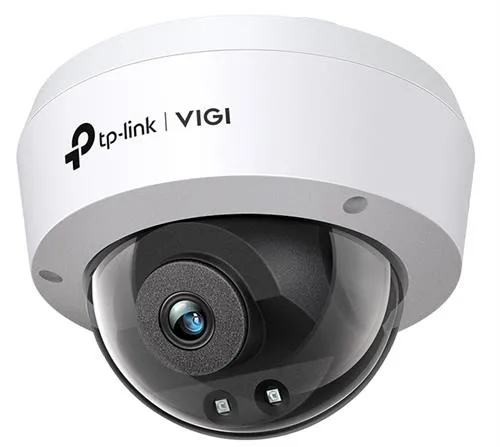
TP-Link VIGI C240I wired dome camera with a fixed 2.8 mm lens, 4 MP video, up to 30 m infrared night vision and PoE or 12 V DC power.
R1,049.00
Supplier has stock — 1 avail
Clear fulfilment, warranty and payment details.
TP-LINK VIGI C240I
Cover a shared entrance, reception or passage with a fixed 2.8 mm lens and 4 MP video. The C240I pairs a wide view with infrared night vision in an IP67, IK10-rated dome.
Framing and night vision
The 2.8 mm lens frames a wide approach from a single position. Adjust the camera angle at installation. After dark, two infrared LEDs provide a monochrome view, and Smart IR helps manage illumination on nearby objects. Digital wide dynamic range and 3D noise reduction help with uneven light and low-light noise.
Event review
Mark a line or zone and configure alerts for crossings, entry, exit or tampering. People and vehicle classification helps narrow the events you review. H.265+ is available on the main stream, with a separate lower-resolution stream for routine viewing.
Installation and recording
Connect to an IEEE 802.3af or 802.3at PoE port, or power the camera separately from a 12 V DC supply. Use a compatible recorder or management system for recording. Adjust and check the installed view from the VIGI app, supported web interface or recorder.
| Model | TP-Link VIGI C240I, fixed 2.8 mm lens |
|---|---|
| Sensor | 1/3-inch progressive-scan CMOS |
| Lens | Fixed 2.8 mm, f/2.2, M12 mount |
| Field of view | 88.8° horizontal, 48.9° vertical, 106.5° diagonal |
| Manual aiming | 0° to 355° pan, 0° to 75° tilt |
| Infrared | Two 850 nm LEDs, rated up to 30 m, IR-cut filter |
| Image processing | Digital WDR, 3D DNR, Smart IR, backlight and highlight compensation |
| Main stream | Up to 2560 × 1440 at 25 fps (50 Hz) or 30 fps (60 Hz) |
|---|---|
| Sub-stream | Up to 640 × 480 at 25 fps (50 Hz) or 30 fps (60 Hz) |
| Rotation limit | Up to 20 fps at 90° or 270° rotation |
| Encoding | H.265+, H.265, H.264+ or H.264 on main stream. H.265 or H.264 on sub-stream. |
| Event rules | Person and vehicle classification, motion, tampering, intrusion, line crossing, region entry and exit, object removal and abandonment |
| Privacy settings | Up to four masks and one region of interest |
| Ethernet | One RJ45 10/100 Mbps port, ONVIF support |
|---|---|
| Power | IEEE 802.3af/at PoE, class 0, or 12 V DC ±5%, 5 W maximum on DC |
| Enclosure | IP67 ingress protection and IK10 impact resistance |
| Operating conditions | −30 to 60 °C, up to 95% RH non-condensing |
| Dimensions | 115 mm diameter × 86 mm high |
| Camera weight | Approx. 270 g |
| Manufacturer-listed package | Camera, quick start guide, weatherproof cable fittings and mounting accessories |
Use official support resources for this product. Each link opens in a new tab.
Match the hardware revision on the camera label before choosing the installation guide or firmware. TP-Link lists VIGI PC Client for Windows 10 and 11.
Open official support (opens in a new tab)Help other shoppers by sharing an honest review.
Write a reviewYou are offline. Reconnect to check prices and shop.
Reviews
There are no reviews yet.