
Tapo C545D South Africa support
Match the camera’s hardware version to the setup guide and firmware information. Use the Tapo app for setup and device controls.
Open official support (opens in a new tab)Checking which support options are available…
Who would you like help from?
Enter your name to begin your live chat with an online consultant.
What can we help you with?
Your details are used only to respond. MatzoBot requests are securely passed to the MatzoTech team.
Your request has been emailed to MatzoTech. A consultant will reply using the email address or mobile number you supplied.

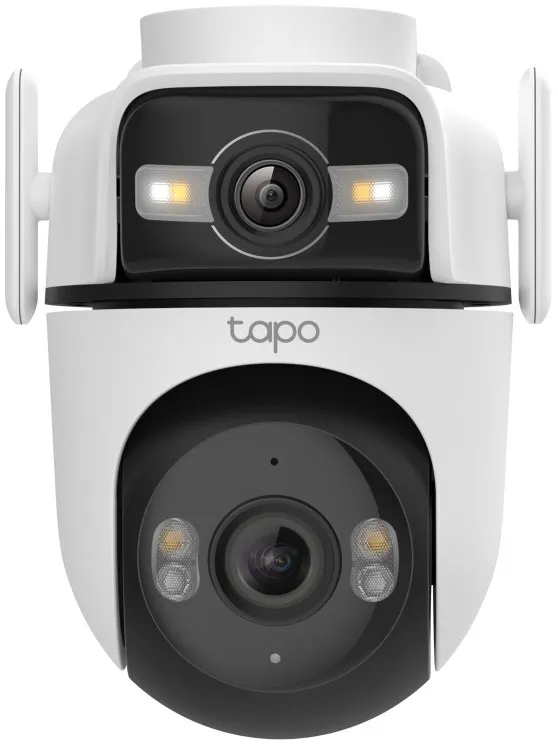
Tapo C545D outdoor dual 2K camera with a 165° wide view, motorised 6 mm telephoto lens, Ethernet or Wi-Fi and IP66 housing.
R2,309.00
Supplier has stock — 1 avail
Clear fulfilment, warranty and payment details.
Official manufacturer overview
TP-Link Global Support · TP-Link’s setup guide covers the Tapo C545D and TC47 camera family. This product is the Tapo C545D. Check its hardware revision before following the guide.
Play to load this video from YouTube.
Tapo C545D | Outdoor dual-lens camera
Use the fixed 165° wide-angle view to watch the surroundings and the motorised telephoto lens to follow motion in a narrower area. Both lenses record in 2K and the outdoor camera can connect through Wi-Fi or Ethernet.
Two viewpoints
Set the upper lens to cover the key area. The lower 6 mm telephoto lens pans and tilts to shift attention to movement, and can follow supported events detected by the wide lens.
After dark
Select infrared for a black-and-white view, spotlight colour mode for added illumination, or smart switching according to conditions. Use person, pet or vehicle alerts to focus on relevant events.
Network and records
Use 2.4 GHz Wi-Fi or the Ethernet data port. The camera needs its own supported power adapter. Save supported recordings to a microSD card or subscribe to Tapo Care for cloud recording.
| Model | Tapo C545D |
|---|---|
| Video resolution | 2304 × 1296 per lens (2K 3 MP) |
| Wide lens field of view | 165° diagonal, position set manually |
| Telephoto lens | 6 mm with motorised pan and tilt |
| Night modes | Infrared, spotlight colour and smart mode |
| Detection | Motion, people, pets and vehicles |
|---|---|
| Audio | Microphone and speaker for two-way audio |
| Local storage | microSD up to 512 GB, sold separately |
| Cloud storage | Optional Tapo Care subscription |
| Wi-Fi | 2.4 GHz |
|---|---|
| Wired network | 1 × 10/100 Mbps RJ45 |
| Weather resistance | IP66 |
| Power | Separate DC adapter required |
Use the separate power adapter with either networking method. Match the unit’s hardware revision to its documentation.
Use official support resources for this product. Each link opens in a new tab.
Match the camera’s hardware version to the setup guide and firmware information. Use the Tapo app for setup and device controls.
Open official support (opens in a new tab)Help other shoppers by sharing an honest review.
Write a reviewYou are offline. Reconnect to check prices and shop.





Reviews
There are no reviews yet.