
Room controls
Keep volume and mute within reach
Make quick changes with the marked controls on the handset. Camera and call options depend on the video bar and meeting setup.
Checking which support options are available…
Who would you like help from?
Enter your name to begin your live chat with an online consultant.
What can we help you with?
Your details are used only to respond. MatzoBot requests are securely passed to the MatzoTech team.
Your request has been emailed to MatzoTech. A consultant will reply using the email address or mobile number you supplied.

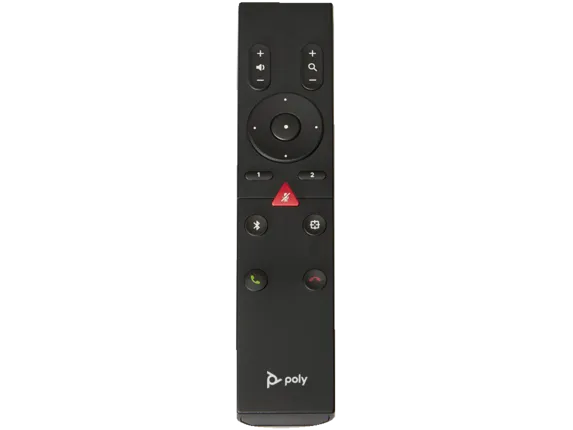
HP Poly Studio 875L4AA Bluetooth remote for compatible R30, Studio USB, V12, V52 and V72 video bars.
R2,419.00
Supplier has stock — 10 avail
Clear fulfilment, warranty and payment details.
HP Poly | Bluetooth remote control
Use the 875L4AA handheld remote with a compatible Poly Studio video bar to adjust volume, mute the microphone and move through supported camera controls. The remote pairs with the video bar over Bluetooth.
Room controls
Make quick changes with the marked controls on the handset. Camera and call options depend on the video bar and meeting setup.
Compatibility
HP lists R30, Studio USB, V12, V52 and V72 in the accessory name. Check your exact host and its user guide before using it.
Setup
Select the connected video bar and follow its Bluetooth remote procedure in the HP guide. First use, a reset or re-enabling the remote connection can require manual pairing.
This listing is for the handset. Use the guide for the video bar it will control.
| Manufacturer | HP Poly |
|---|---|
| Part number | 875L4AA |
| UPC | 197497663754 |
| Product type | Handheld video-bar remote |
| Connection | Bluetooth |
| HP-listed model families | Poly Studio R30, Studio USB, V12, V52 and V72 |
|---|---|
| Controls visible on the supplied image | Volume, navigation, zoom, presets, mute and call buttons |
| Setup | Follow the host-specific remote pairing section in Poly Studio Desktop |
This listing is for the handset. Use the guide for the video bar it will control.
Use official support resources for this product. Each link opens in a new tab.
Open the English guide and find the pairing steps for your exact Studio USB, R30 or Studio V model.
Open official support (opens in a new tab)Help other shoppers by sharing an honest review.
Write a reviewYou are offline. Reconnect to check prices and shop.




Reviews
There are no reviews yet.