
Mercusys MP510 KIT support
Manuals and Windows Powerline Utility. Use the hardware version and region shown on your adapter before selecting firmware.
Open official support (opens in a new tab)Checking which support options are available…
Who would you like help from?
Enter your name to begin your live chat with an online consultant.
What can we help you with?
Your details are used only to respond. MatzoBot requests are securely passed to the MatzoTech team.
Your request has been emailed to MatzoTech. A consultant will reply using the email address or mobile number you supplied.

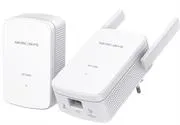
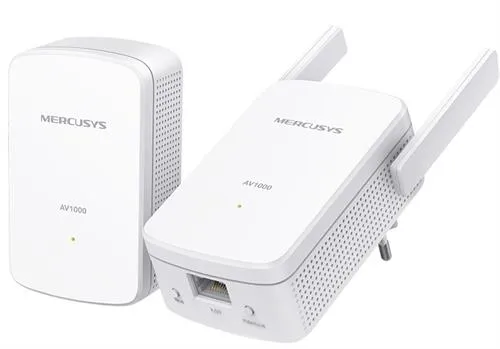
Mercusys MP510 KIT with HomePlug AV2 powerline, a 2.4 GHz N300 access point and one Gigabit Ethernet port on each adapter.
R1,119.00
Supplier has stock — 1 avail
Clear fulfilment, warranty and payment details.
MERCUSYS MP510 KIT
Connect the MP500 to your router over Ethernet and plug the MP510 into a wall socket where you need Wi-Fi or a wired connection. The kit carries the network link over the existing electrical circuit.
TWO ADAPTERS
The MP500 links to your router. In the destination room the MP510 creates a 2.4 GHz Wi-Fi access point and provides a Gigabit Ethernet port for a wired device.
POWERLINE LINK
HomePlug AV2 uses the household wiring between adapters. Wiring quality, electrical noise and the distance between sockets affect the connection. The maximum link rate is a theoretical figure.
SETUP
Use the Pair button to secure the link and the Wi-Fi Clone button on the MP510 if you want to copy the router’s Wi-Fi credentials. Match any software or firmware to the hardware version and region on the label.
| Model | MP510 KIT |
|---|---|
| Units | MP510 Wi-Fi extender and MP500 adapter |
| Powerline | HomePlug AV2, AV1000 class, up to 1,000 Mb/s theoretical |
| Modulation | OFDM |
| Wall wiring range | Up to 300 m on the same circuit under favourable conditions |
| Ethernet | One Gigabit Ethernet port per unit |
| Wi-Fi on MP510 | 2.4 GHz IEEE 802.11b/g/n, up to 300 Mb/s theoretical |
| Powerline encryption | 128-bit AES |
| Buttons | Pair/Reset on both units, Wi-Fi Clone on MP510 |
| Retail box | MP510 plus MP500, RJ45 Ethernet cables and installation guide |
|---|---|
| Warranty | Two-year limited warranty as listed for this Matzotech offer |
| Setup environment | 0–40 °C operating temperature per manufacturer V1 reference |
Use official support resources for this product. Each link opens in a new tab.
Manuals and Windows Powerline Utility. Use the hardware version and region shown on your adapter before selecting firmware.
Open official support (opens in a new tab)Help other shoppers by sharing an honest review.
Write a reviewYou are offline. Reconnect to check prices and shop.



Reviews
There are no reviews yet.