
HP EliteBoard G1a maintenance and service guide (PDF)
Official guide to setup, ports and replaceable memory and storage. Match the chassis and product number before servicing.
Open official support (opens in a new tab)Checking which support options are available…
Who would you like help from?
Enter your name to begin your live chat with an online consultant.
What can we help you with?
Your details are used only to respond. MatzoBot requests are securely passed to the MatzoTech team.
Your request has been emailed to MatzoTech. A consultant will reply using the email address or mobile number you supplied.

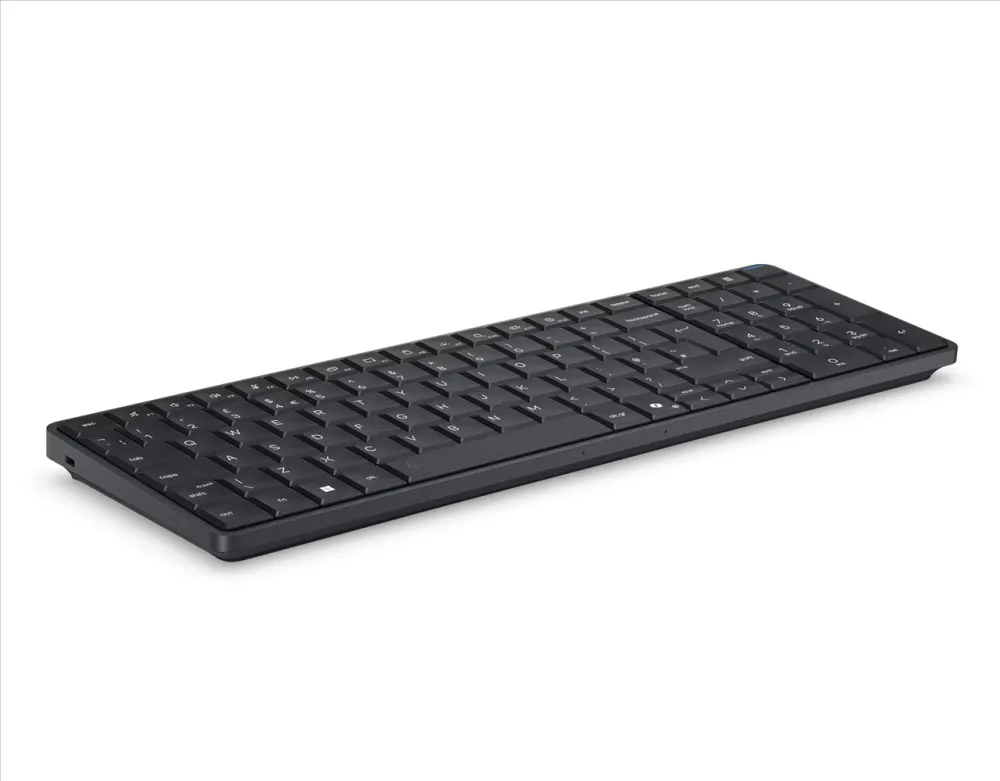
HP EliteBoard G1a DD2Q8ET with Ryzen AI 7 PRO 350, 32 GB DDR5, a 1 TB NVMe SSD and Windows 11 Pro in a keyboard PC.
R44,939.00
Supplier has stock — 9 avail
Clear fulfilment, warranty and payment details.
Official manufacturer overview
HP Support · HP demonstrates the EliteBoard G1a family. Display, battery and bundled accessories vary with the configuration.
Play to load this video from YouTube.
HP ELITEBOARD G1A · DD2Q8ET
The EliteBoard G1a puts the computer in a full-size keyboard. Set it beside a compatible display and use the numeric keypad for figures, with 32 GB of memory and a 1 TB NVMe SSD for work files and applications.
DESK SETUP
The processor, storage, speakers and microphones sit inside the keyboard housing. This listing is for the detachable-cable configuration. The local image shows the EliteBoard family design. Keyboard legends and bundled accessories can vary.
MEMORY AND STORAGE
HP documents two SO-DIMM sockets in this design and configurations up to 64 GB. The 1 TB SSD occupies the internal M.2 2280 bay. Check the fitted drive part before planning a replacement or a storage upgrade.
PROCESSOR
The Ryzen AI 7 PRO 350 combines eight CPU cores, integrated Radeon 860M graphics and an AMD AI accelerator. Compatible applications can use the accelerator for supported tasks. The processor rating is up to 50 NPU TOPS.
CONNECTIONS
HP documents display output over both USB-C ports on the detachable-cable chassis. Use a compatible display or adapter. The configuration lists the MediaTek MT7925 wireless module with Wi-Fi 7 and Bluetooth 6.0.
| Model | HP EliteBoard G1a Next Gen AI PC |
|---|---|
| Product number | DD2Q8ET |
| Processor | AMD Ryzen AI 7 PRO 350, 8 cores, 16 threads, 2.0 GHz base, up to 5.0 GHz boost, 16 MB L3 cache |
| Graphics | Integrated AMD Radeon 860M |
| NPU | AMD Ryzen AI, up to 50 TOPS processor specification |
| Operating system | Windows 11 Pro |
| Installed memory | 32 GB (1 × 32 GB) DDR5-5600 SO-DIMM |
|---|---|
| Memory expansion | Two DDR5 SO-DIMM sockets, up to 64 GB in documented HP family configurations |
| Installed storage | 1 TB M.2 2280 PCIe NVMe solid-state drive |
| Storage service | One M.2 2280 SSD bay. HP lists a 1 TB Gen5 drive option. Confirm the fitted drive part separately from link speed. |
| High-speed USB-C | 1 × USB-C 40 Gbps with DisplayPort output and up to 65 W power input on detachable-cable design |
|---|---|
| Secondary USB-C | 1 × USB-C 10 Gbps with DisplayPort output |
| Wireless module | MediaTek MT7925 Wi-Fi 7 and Bluetooth 6.0 as listed |
| Audio | Integrated stereo speakers and microphones |
| Security slot | Nano security lock slot |
| Form factor | Desktop PC integrated into a keyboard with numeric keypad |
|---|---|
| Power supply | 65 W USB-C GaN adapter as listed. Regional wall plug depends on the supplied kit. |
| Chassis dimensions | Approximately 358 × 119 mm footprint, 12.5 mm front to 17.5 mm rear per HP family service guide |
| Service | Three-year onsite service is listed for DD2Q8ET by HP Shop South Africa. Check HP serial-number entitlement and terms for the supplied unit. |
Use the HP product and serial numbers to confirm fitted options, Windows 11 drivers and service entitlement. Select a display or adapter that supports USB-C DisplayPort.
Use official support resources for this product. Each link opens in a new tab.
Official guide to setup, ports and replaceable memory and storage. Match the chassis and product number before servicing.
Open official support (opens in a new tab)Help other shoppers by sharing an honest review.
Write a reviewYou are offline. Reconnect to check prices and shop.
Reviews
There are no reviews yet.