
Epson L3351 drivers and manuals
Official Epson model support. Select your Windows or macOS version for available print and scan software and open Manuals & Documentation for the user guide.
Open official support (opens in a new tab)Checking which support options are available…
Who would you like help from?
Enter your name to begin your live chat with an online consultant.
What can we help you with?
Your details are used only to respond. MatzoBot requests are securely passed to the MatzoTech team.
Your request has been emailed to MatzoTech. A consultant will reply using the email address or mobile number you supplied.

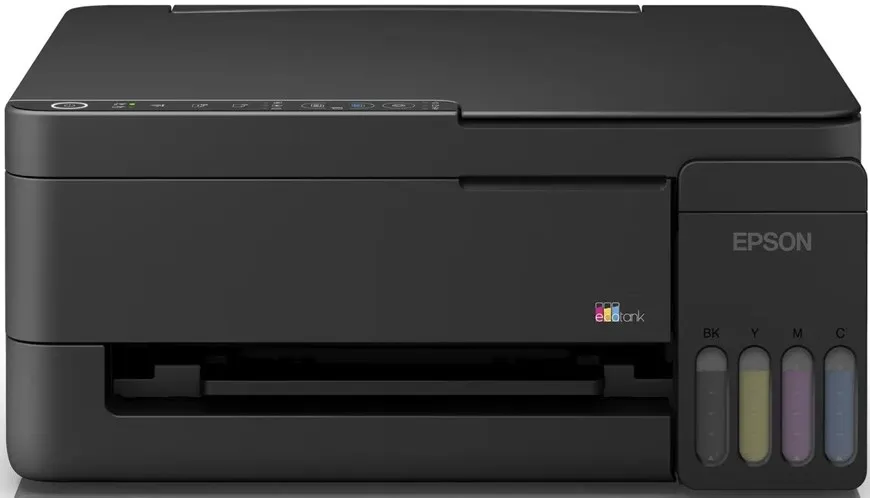
Epson EcoTank Home L3351 A4 print, scan and copy with Wi-Fi, Wi-Fi Direct, USB and refillable Epson 103 ink tanks.
R4,259.00
Supplier has stock — 4 avail
Clear fulfilment, warranty and payment details.
Official manufacturer overview
Epson Latinoamérica · Epson’s Wi-Fi setup guide for the L3350, L3351 and L3352 family, with English on-screen guidance. Use the L3351 support link in Driver & Software Downloads for your computer software and the South African ink details in Specifications.
Play to load this video from YouTube.
EPSON ECOTANK HOME | A4 COLOUR INK TANK
The Epson EcoTank Home L3351 puts A4 colour printing, flatbed scanning and copying in one compact black unit. Use Wi-Fi to share it around the home, or connect a computer over USB. Four ink windows show the levels at a glance, so you can check the tanks before a long print job.
DAILY PRINTING
Print school assignments, forms and household documents at Epson’s rated A4 speeds of 11 images per minute in black and 6 in colour. Use the manual two-sided option when you want to print on both sides.
FLATBED SCANNING
Lift the lid to scan an A4 document or copy a page directly from the glass. The flatbed handles one side at a time, which suits single originals and pages you cannot feed through rollers.
WIRELESS SETUP
Connect through your home Wi-Fi network or use Wi-Fi Direct to connect a compatible device without a router. Epson Smart Panel helps with setup and controls, while AirPrint and Mopria give compatible mobile devices their own print options.
REFILLABLE TANKS
Read the four front ink windows without opening the printer. Refill each colour with the corresponding Epson 103 bottle. The first fill charges the print head, so the included set and replacement bottles have separate yield estimates.
| Model | Epson EcoTank Home L3351 |
|---|---|
| Manufacturer order code | C11CL62414 |
| Colour | Black |
| Functions | Print, scan and copy |
| Print technology | Epson Micro Piezo inkjet, four dye inks |
| A4 ISO print speed | 11 ipm black and 6 ipm colour (ISO/IEC 24734, default simplex) |
| Maximum print resolution | 5,760 × 1,440 dpi |
| Two-sided printing | Manual |
| Scanner | A4 CIS flatbed, single-sided. No automatic document feeder. |
|---|---|
| Optical scan resolution | 1,200 × 2,400 dpi (horizontal × vertical) |
| Copy resolution | 600 × 600 dpi |
| Maximum copy size | A4 or Letter |
| Paper input | One rear feeder, up to 100 sheets of supported plain paper. Other media have lower limits. |
| Supported media examples | A4, A5, A6, Letter, Legal, No. 10 envelopes and compatible photo media. See Epson’s guide for size-specific loading limits. |
| Borderless printing | Supported with compatible photo media and settings |
| Replacement ink family | Epson 103 black, cyan, magenta and yellow for the Africa region |
|---|---|
| Included bottles | Four 65 ml bottles, one of each colour |
| Included-set estimate | Up to 3,600 black pages and 6,500 colour pages as stated by Epson South Africa. Initial charging uses some ink. |
| Replacement 103 set estimate | Up to 4,500 black pages and 7,500 colour pages, based on Epson South Africa’s 103 replacement-bottle reference. |
| Yield method | Epson extrapolates the replacement rating from ISO/IEC 24712 test patterns. Actual yield depends on coverage, settings, paper, printing frequency and conditions. |
| Interfaces | USB, Wi-Fi and Wi-Fi Direct |
|---|---|
| Mobile printing and setup | Epson Smart Panel, Apple AirPrint and Mopria on compatible devices and networks |
| Computer software | Epson provides print and scan resources for Windows and macOS. Select the operating system and version on the official support page. |
| Local manufacturer coverage | Epson South Africa lists 12 months carry-in or 50,000 pages, subject to regional terms. |
| Dimensions | 361 × 317 × 162 mm (width × depth × height) |
|---|---|
| Weight | 4.2 kg as listed by Epson South Africa |
| Energy use | 12 W standalone copying with the ISO/IEC 24712 pattern, 6 W ready, 0.5 W sleep and 0.1 W off |
| Package | Printer, four ink bottles, power cable, setup guide, user manual and warranty document |
Check the printer rating label before connecting power. Leave clearance for the rear paper feeder and the scanner lid.
Use official support resources for this product. Each link opens in a new tab.
Official Epson model support. Select your Windows or macOS version for available print and scan software and open Manuals & Documentation for the user guide.
Open official support (opens in a new tab)Help other shoppers by sharing an honest review.
Write a reviewYou are offline. Reconnect to check prices and shop.

Reviews
There are no reviews yet.