
Canon GI-45 ink identification
Official GX2000-series reference showing GI-45 magenta and yellow bottle designations. Confirm the exact regional printer and ink number.
Open official support (opens in a new tab)Checking which support options are available…
Who would you like help from?
Enter your name to begin your live chat with an online consultant.
What can we help you with?
Your details are used only to respond. MatzoBot requests are securely passed to the MatzoTech team.
Your request has been emailed to MatzoTech. A consultant will reply using the email address or mobile number you supplied.

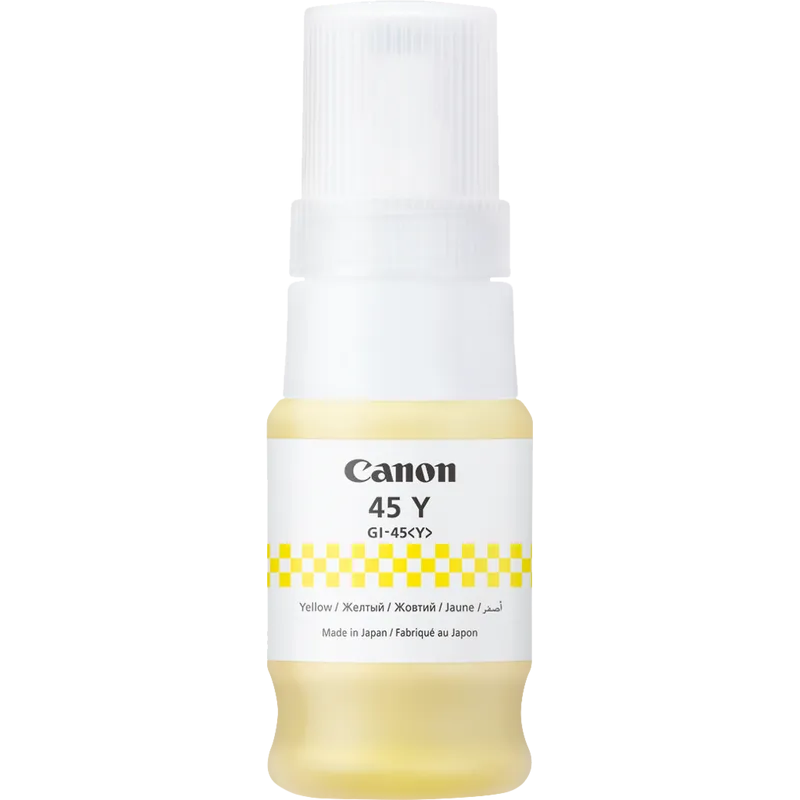
Canon GI-45Y yellow pigment-ink bottle, 40 ml, for MAXIFY GX1040/GX2040. Up to 3,000 colour pages with a full colour set under Canon’s stated test conditions.
R299.00
Supplier has stock — 1 avail
Clear fulfilment, warranty and payment details.
CANON GI-45 · YELLOW PIGMENT INK
Canon GI-45Y is a 40 ml yellow pigment-ink refill for MAXIFY GX1040 and GX2040 printers. It replenishes the matching yellow tank within the printer’s four-colour system, with a clearly defined bottle identity and yield basis to check before a refill.
THE COLOUR YOU NEED
This listing supplies one yellow GI-45Y ink bottle. Canon identifies the ink as pigment based. Match both GI-45 and the Y colour designation to the printer’s ink record; this is a refill bottle rather than a replaceable printhead cartridge or a complete colour set.
EXACT PRINTER MATCH
The manufacturer lists MAXIFY GX1040 and MAXIFY GX2040 for this ink. Both original printer references are retained. Check the full model and bottle number before ordering; a similar MAXIFY name or a different regional ink number is not sufficient to establish interchangeability.
YIELD WITH ITS CONDITIONS
Canon quotes up to 3,000 colour pages using a full set of colour inks, rising to 4,500 in economy mode with reduced print density. The estimate uses Canon’s test method, the ISO/IEC 24712 colour chart and simulated continuous printing with replacement bottles after initial setup. Your documents and usage can change the result considerably.
A CONTROLLED REFILL
Follow the printer’s refill instructions for the yellow tank. Align and insert the bottle carefully, support it during filling and remove it when the ink reaches the upper limit line. Canon advises against shaking the bottle or leaving it inserted in the tank; close the cap and keep the bottle upright when storing it.
| Brand / ink family | Canon / GI-45 |
|---|---|
| Ink model | GI-45<Y> / GI-45Y |
| Colour | Yellow |
| Ink type | Pigment ink, manufacturer description |
| Nominal ink volume | 40 ml |
| Supplied quantity | 1 ink bottle; not a complete colour set |
| Catalogue ordering code | 6287C001AA |
| Manufacturer core code | 6287C001 |
| Verified model 1 | Canon MAXIFY GX1040 |
|---|---|
| Verified model 2 | Canon MAXIFY GX2040 |
| Tank match | Yellow tank / GI-45<Y> designation |
| Compatibility boundary | Exact listed regional model and bottle number; no interchangeability with other ink families inferred |
| Standard colour yield | Up to 3,000 pages with a full set of colour inks |
|---|---|
| Economy-mode colour yield | Up to 4,500 pages with a full colour set; lower print density |
| Manufacturer test basis | Canon individual method using ISO/IEC 24712 colour chart |
| Measurement scenario | Continuous-printing simulation; replacement ink bottles after initial setup |
| Actual yield | Varies significantly with printed content and other operating factors |
| Maintenance use | Colour ink can be used during monochrome printing; cleaning and deep cleaning consume ink |
| Bottle insertion | Align with matching tank inlet, invert and insert carefully, supporting bottle |
|---|---|
| Fill limit | Remove bottle once ink reaches upper limit line; do not leave it in tank |
| Storage guidance | Cap securely; store upright, away from excessive heat |
| Mixing | Do not mix with water or other ink |
| Documentation | Official GX2000-series ink identification and refill procedure; confirm GI-45 regional designation |
The page yield is a colour-set estimate, not a guaranteed individual-bottle result. Confirm the printer’s GI-45 colour designation before refilling; keep the printer manual available for the correct fill-line procedure.
Use official support resources for this product. Each link opens in a new tab.
Official GX2000-series reference showing GI-45 magenta and yellow bottle designations. Confirm the exact regional printer and ink number.
Open official support (opens in a new tab)Official procedure covering matching tank colour, bottle insertion, upper fill line, removal and storage. This is documentation, not a software package.
Open official support (opens in a new tab)Compare 2–5 products side by side
Help other shoppers by sharing an honest review.
Write a reviewYou are offline. Reconnect to check prices and shop.
Reviews
There are no reviews yet.