Top of pagePrimary navigation
Flash sale Limited-time prices and current MatzoTech offers Shop offers

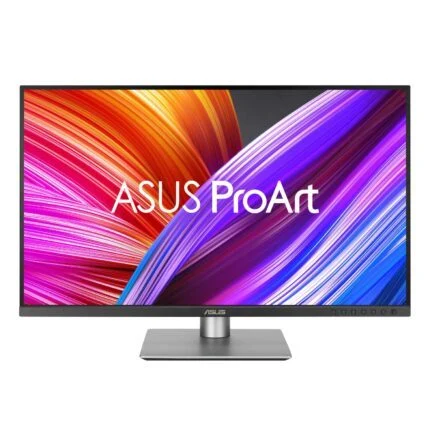
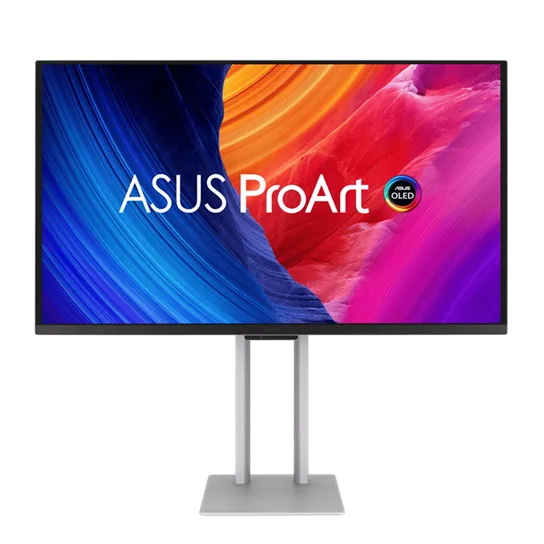
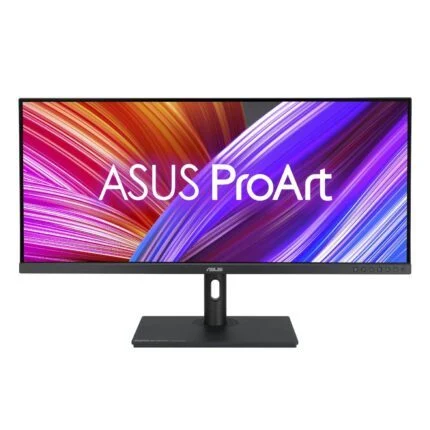
ASUS ProArt Display PA27UCDMR 27-inch 4K UHD QD-OLED 240Hz Professional Monitor

0.0 No reviews yet Write a review
SKU: PA27UCDMR
New Supplier has stock — 4 avail

ASUS ProArt PA27UCDMR: 26.5-inch viewable 4K QD-OLED, up to 240Hz, factory ΔE < 1 calibration and Thunderbolt 4 with up to 96W PD. Explore colour, connections and OLED-care details.

R37,299.00

VAT included · Secure checkout

Supplier has stock — 4 avail

Key product details

Full specifications below
  • Ean: 4711636190770
  • Gtin: 4711636190770
  • Brand: Asus
  • Condition: New
Add to wishlist

Delivery & support

Clear fulfilment, warranty and payment details.

  • Availability Supplier has stock — 4 avail Supplier has stock — 4 avail
  • Delivery Nationwide courier delivery or collection from Strand, Cape Town. Courier nationwide or Strand collection
  • Dispatch Ships within 24 hours. Ships within 24 hours
  • Warranty Manufacturer warranty applies where stated on the product page. As stated on this page
  • Returns See our Returns Policy for eligible change-of-mind and faulty goods procedures. See Returns Policy
  • Secure payment PayFast checkout with card, Instant EFT, and Mobicred. PayFast · card · EFT · Mobicred
Ask us a question

ASUS ProArt · PA27UCDMR · 4K QD-OLED

Every detail. Every shade. Every frame.

Give colour-critical work a precise, fluid canvas. The ProArt PA27UCDMR combines a 26.5-inch 4K QD-OLED panel with factory colour calibration, up to 240Hz refresh and a Thunderbolt 4 connection that can carry your picture, peripherals and laptop power.

ASUS ProArt Display PA27UCDMR 27-inch 4K UHD QD-OLED 240Hz Professional Monitor
4K UHD3840 × 2160
240HzMaximum refresh
ΔE < 1Factory colour accuracy
96WUSB-C Power Delivery

The creative canvas

Fine detail meets deep contrast.

A 3840 × 2160 image across the 26.5-inch viewable panel gives photographs, timelines and detailed artwork room to breathe. Quantum-dot OLED colour and individual emissive pixels bring dark tones into focus. The anti-reflection surface, 10-bit colour depth and specified 99% DCI-P3 and 100% sRGB coverage support a considered colour workflow.

Colour management

A calibrated starting point. A repeatable workflow.

Each display arrives factory calibrated, with its own pre-calibration report. ProArt Hardware Calibration can write colour parameters into the monitor rather than keeping them only on one computer. ProArt Calibration supports Windows and macOS; use a supported external colourimeter and the appropriate software. A built-in measuring sensor or bundled colourimeter is not implied.

HDR with context

Brilliant highlights. Honest brightness figures.

ASUS rates peak HDR brightness at 1000 nits for a 3% area; typical brightness is 250 nits. These describe different conditions, not sustained full-screen 1000-nit output. HDR10, HLG and adjustable PQ curves provide useful viewing choices. Dolby Vision is listed with a firmware-update condition, so confirm the supplied firmware and current release notes before relying on it.

Motion and detail

Review the frame. Follow the movement.

The panel supports up to 240Hz and a manufacturer-rated 0.1ms grey-to-grey response. Adaptive-Sync can help match refresh to a compatible source. HDMI 2.1 FRL and DisplayPort 1.4 with DSC give workstation connection options; the actual 4K refresh, colour depth and HDR combination still depends on the graphics output, cable and selected mode.

A simpler desk

One connection can do more.

Dual Thunderbolt 4 ports support a host connection and display daisy chain. The laptop port supplies up to 96W; the downstream port is identified as 15W in ASUS setup guidance. The USB hub adds one Type-A and one Type-C port. A laptop needing more power may still need its own charger, and HDMI video needs a separate USB upstream connection for the hub.

OLED care

Make protection part of the routine.

Panel and image protection, pixel shifting, a screen saver and proximity sensing reduce the risk associated with static imagery. Uniform Brightness can keep changing window sizes more consistent, up to 250 nits. Protection is not a burn-in immunity guarantee; follow the screen-care and sensing-cycle guidance rather than disabling maintenance for uninterrupted static work.

Designed around your workspace

Adjust the view. Plan the fit.

Raise the screen through 130mm, tilt it or pivot into portrait orientation. The silver chassis includes a quick-release stand, joystick control, ambient-light sensor and two 3W speakers. VESA 100 × 100mm mounting offers another installation route. Measure the complete monitor and mounting load; the slender panel edge is not the depth of the entire enclosure.

Specifications

Identity & panel

ManufacturerASUS
ModelProArt Display OLED PA27UCDMR
Catalogue SKUPA27UCDMR
Listed GTIN4711636190770
Market size / viewable diagonal27-inch class / 26.5 inches viewable
Panel technologyQD-OLED
Resolution3840 × 2160 pixels
Aspect ratio16:9
SurfaceAnti-reflection
Pixel density166 PPI
Pixel pitch0.155 mm
Active viewing area589.97 × 332.93 mm (H × V)
Viewing angle178° horizontal / 178° vertical at contrast ratio ≥10
ColourSilver

Colour, HDR & calibration

Colour depth10-bit; approximately 1.0737 billion colours
sRGB coverage100% manufacturer specification
DCI-P3 coverage99% manufacturer specification
Factory colour accuracyΔE < 1; individual pre-calibration report
Typical brightness250 cd/m²
Peak HDR brightness1000 cd/m² at 3% area; not a full-screen sustained rating
Contrast ratio1,500,000:1 manufacturer specification
HDR formatsHDR10 / HLG; Dolby Vision listed subject to firmware-update requirement
HDR certificationVESA DisplayHDR True Black 400
Hardware calibrationProArt Hardware Calibration; colour parameters stored in monitor scaler
Calibration equipmentSupported external calibrator required; no included colourimeter established
Software platformsProArt Calibration for Windows and macOS; check supported OS and calibrator list
Third-party calibrationCalman Ready / ColourSpace integration advertised with a dated Q2 2026 availability note; verify current software and firmware
Gamma choices1.8 / 2.0 / 2.2 / 2.4 / 2.6
Colour controlsRGB gain/offset; five colour-temperature modes
ProArt presetsNative, sRGB, BT.709, Adobe RGB, DCI-P3, BT.2020, DICOM, HDR PQ/HLG variants, Dolby Vision and CAL 1/2/3; preset availability depends on mode/firmware
HDR toolsHDR Preview; PQ Hard Clip, PQ Optimized and PQ Basic
Firmware qualificationAugust 2026 user guide documents Dolby Vision OSD controls; manufacturer overview still carries firmware-update caveat. Actual supplied revision not checked.

Motion & image tools

Maximum refresh rate240Hz; source, cable and operating-mode dependent
Response time0.1ms grey-to-grey, manufacturer rating
Variable refreshAdaptive-Sync
Picture modesPicture-in-Picture / Picture-by-Picture
Composition toolsQuickFit Plus
Content protectionHDCP 2.3 in current official technical specification
Automatic rotationSupported through DisplayWidget Center
KVM switchingNot established for this model; USB hub and PBP do not establish KVM support
Rapid Rendering modesUser guide: Native 48–240Hz; up-to-120Hz 48–120Hz; up-to-240Hz uses frame doubling at 48–96Hz and passthrough 96–240Hz; FreeSync Premium Pro 48–120Hz
VRR mode restrictionsUser guide requires PIP/PBP off and Aspect Control Full for Rapid Rendering

Connections & power delivery

Thunderbolt 42 ports; host/upstream plus downstream daisy-chain connection
Host USB-C powerUp to 96W Power Delivery; check laptop requirements
Downstream power15W port identified in official daisy-chain guidance
DisplayPort1 × DisplayPort 1.4 with DSC
HDMI1 × HDMI 2.1 FRL
USB hub1 × USB 3.2 Gen 2 Type-A and 1 × USB 3.2 Gen 2 Type-C
USB upstreamThunderbolt/compatible USB-C connection; separate USB upstream needed when using HDMI video
Host requirementsCompatible graphics output, cable and OS; maximum resolution/refresh/HDR combinations must be checked for the actual host
Speakers2 × 3W

OLED care & controls

ProtectionASUS OLED Care: panel/image protection, pixel shift, screen saver and Off Sensing
SensorsAmbient-light and proximity sensors
Uniform BrightnessOptional setting; up to 250 nits with more consistent window-size behaviour
Burn-in qualificationRisk reduction and maintenance features; not immunity from permanent image retention
Control softwareDisplayWidget Center; select compatible Windows/macOS release from official support

Mechanics, dimensions & power

Tilt−5° to +20°
Pivot−90° to +90°
Height adjustment0–130 mm
Wall mountVESA 100 × 100 mm
SecurityKensington lock provision
With stand — W × H × D608 × 571 × 228 mm, estimated
Without stand — W × H × D608 × 354 × 47 mm, estimated
Net weight with stand7.2 kg, estimated
Net weight without stand4.7 kg, estimated
Box dimensions690 × 550 × 275 mm, estimated
Gross weight13.8 kg, estimated
AC input100–240V, 50/60Hz
Published consumption25.3W typical On Mode under Energy Star 8.0 definition in user guide; website lists <25.3W. Not maximum draw or laptop-charging budget.
Power savingUser guide: 0.5W standby; technical web page: <0.5W
Hard-switch off0W manufacturer specification
Electronic power off0.3W in user guide; hard AC switch off 0W
Operating temperature0–40°C in user guide
Storage temperature−20–60°C in user guide

Package & service

Existing package listingMonitor, quick-release stand, power cord, Thunderbolt 4 cable, USB-C cable, DisplayPort cable, pre-calibration report, Quick Start Guide and warranty card
Regional qualificationASUS says accessories vary by region; confirm actual South African carton and mains lead
WarrantyExisting listing: 36 months; ASUS specification: 3 years including panel burn-in, subject to applicable local eligibility and terms
Firmware & updatesUse exact PA27UCDMR support; installed revision and Dolby Vision enablement not independently established
Optional accessoryProArt CaliContrO MCA02 sold separately; supported functions vary by OS/model

Peak and typical brightness are different ratings. Maximum display modes depend on the source and cable. Confirm firmware-dependent features and local warranty eligibility before purchase.

Driver & Software Downloads

Use official support resources for this product. Each link opens in a new tab.

PA27UCDMR — drivers, calibration software and available updates

Official exact-model support. Select the appropriate OS, review ProArt Calibration and monitor utilities, and check applicable firmware/release notes. No installed-version or permanently latest-version claim is made.

Open official support (opens in a new tab)
PA27UCDMR — user guides and installation documents

Official model-specific manuals for connection, HDR/mode restrictions, calibration, OLED care, stand and mounting. Select the appropriate language and revision.

Open official support (opens in a new tab)
No reviews yetBe the first to review this product.

Reviews

There are no reviews yet.

Be the first to review “ASUS ProArt Display PA27UCDMR 27-inch 4K UHD QD-OLED 240Hz Professional Monitor”

Your email address will not be published. Required fields are marked *

Compare 2–5 products side by side

WhatsApp