
Top of pagePrimary navigation
Flash sale Limited-time prices and current MatzoTech offers Shop offers

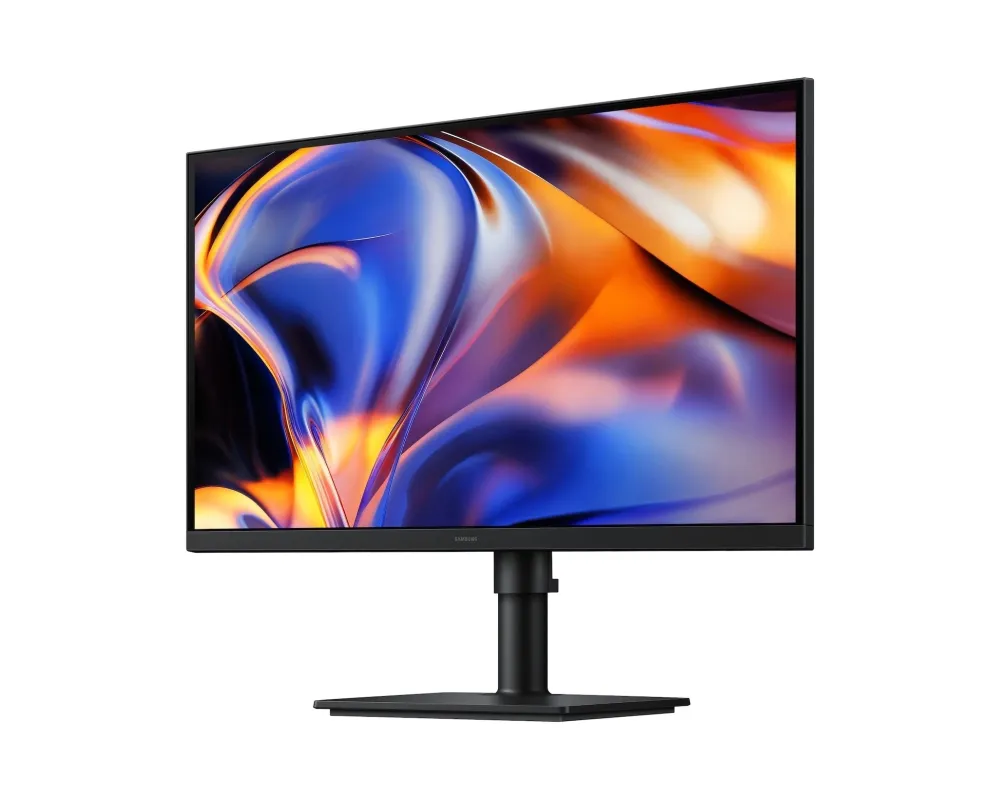
SAMSUNG 27″ 16:9 / 5120×2880 (5K) / Flat / Borderless / IPS / HDR10 / HAS / USB-C (90W) / USB Hub(3.0) / Autoswitch + / 1 DP & 1 HDMI -> 5K BUDGET FRIENDLY HRM

0.0 No reviews yet Write a review
SKU: SAMSUNG LS27H800
New Supplier has stock — 1 avail

Samsung LS27H800 / ViewFinity S8 S80HF 27-inch flat 5K IPS monitor with 60Hz refresh, USB-C charging up to 90W, Ethernet, KVM and a fully adjustable stand. Confirm full regional model code.

R14,299.00

VAT included · Secure checkout

Supplier has stock — 1 avail

Key product details

Full specifications below
  • Mpn: SAMSUNG LS27H800
  • Condition: New
Add to wishlist

Delivery & support

Clear fulfilment, warranty and payment details.

  • Availability Supplier has stock — 1 avail Supplier has stock — 1 avail
  • Delivery Nationwide courier delivery or collection from Strand, Cape Town. Courier nationwide or Strand collection
  • Dispatch Ships within 24 hours. Ships within 24 hours
  • Warranty Manufacturer warranty applies where stated on the product page. As stated on this page
  • Returns See our Returns Policy for eligible change-of-mind and faulty goods procedures. See Returns Policy
  • Secure payment PayFast checkout with card, Instant EFT, and Mobicred. PayFast · card · EFT · Mobicred
Ask us a question

Samsung ViewFinity S8 • S80HF • 27-inch 5K

More detail. A more considered desk.

Bring fine detail and everyday connections into one 27-inch workspace. The ViewFinity S8 S80HF pairs a 5120 × 2880 IPS panel with USB-C power delivery, Ethernet and a built-in KVM, giving documents, creative tools and two-computer working a clear place on the desk.

SAMSUNG 27" 16:9 / 5120x2880 (5K) / Flat / Borderless / IPS / HDR10 / HAS / USB-C (90W) / USB Hub(3.0) / Autoswitch + / 1 DP & 1 HDMI -> 5K BUDGET FRIENDLY HRM
5K5120 × 2880
218 PPIFine detail
90WUSB-C maximum
KVMTwo-computer work

Workspace

Room for the detail that matters

A flat 27-inch IPS panel combines 5K resolution with 218 pixels per inch. Fine text, dense spreadsheets and detailed images have more pixels to work with. Choose an operating-system scaling level that keeps text comfortable; screen size and usable workspace depend on your settings.

Colour and motion

A balanced view for everyday creation

Samsung specifies 99% sRGB coverage, support for up to 1.07 billion colours and HDR10 input. Typical brightness is 350cd/m², with a 1000:1 static contrast ratio. The maximum refresh rate is 60Hz and the response rating is 5ms grey-to-grey; these are panel specifications, not a gaming input-lag or colour-accuracy guarantee.

Connections

Connect the laptop. Keep the desk ready.

A compatible USB-C connection carries display, data and up to 90W charging through one cable. DisplayPort 1.4 and HDMI 2.1 provide separate video inputs. Built-in Ethernet and downstream USB ports place everyday connections at the monitor; USB-B provides another upstream path for KVM use.

Two sources

Share peripherals across your work

The integrated KVM lets compatible connected computers share a keyboard and mouse. Picture-by-Picture shows two sources beside each other; Picture-in-Picture keeps one source in a smaller window. Connect the required upstream USB paths and follow Samsung’s setup instructions. Auto Source Switch+ helps select a newly active input.

Position

Set the screen around your work

Raise or lower the stand through its 120mm adjustment range, tilt it, swivel it or pivot to portrait. A 100 × 100mm VESA mounting pattern provides an alternative to the supplied stand with a suitable separately selected mount. Eye Saver Mode and Flicker Free are available for display comfort.

Control and support

Keep settings and support close

Samsung Display Manager provides supported display-management tools for eligible Windows and macOS configurations. The stable model support page keeps manuals and current software selections together. Check the complete rear-label model code and operating-system requirements before downloading, and select the input, resolution and scaling supported by your actual computer.

Specifications

Identity and display

BrandSamsung
Base modelLS27H800 / S27H800EFA
FamilyViewFinity S8 S80HF
Official referenceSamsung South Africa LS27H800EFAXXA; supplied regional suffix not yet confirmed
Screen size27-inch class
PanelIPS, flat
Aspect ratio16:9
Native resolution5120 × 2880 (5K)
Pixel density218 PPI
Active display area596.7 × 335.7mm (H × V)
Brightness350cd/m² typical; 280cd/m² minimum
Static contrast1000:1
HDR inputHDR10
Colour supportUp to 1.07 billion colours; native panel bit depth not established
sRGB coverage99% manufacturer specification
Maximum refresh rate60Hz
Response time5ms grey-to-grey (GTG)
Viewing angles178° horizontal / 178° vertical

Video and USB connections

DisplayPort1 × DisplayPort 1.4
HDMI1 × HDMI 2.1
USB-C upstream1 × USB-C with video/data and charging
USB-C power deliveryUp to 90W to a compatible connected device
USB-B upstream1 port
USB-A downstream3 × USB-A, USB 3.2 Gen 1
USB-C downstream1 port
Ethernet1 LAN port; link speed not specified in reviewed ZA table
Headphone output1
HDCPVersion2.2 for DisplayPort, HDMI and USB-C
SpeakersNone
Connection qualificationSource, cable and selected timing determine available resolution, refresh rate and colour settings

Multitasking and display controls

KVMBuilt-in; requires compatible connected computers and upstream USB paths
Picture-In-PictureSupported
Picture-By-PictureSupported
Source selectionAuto Source Switch+
Eye Saver ModeSupported
Flicker FreeSupported
Off Timer PlusSupported
Energy Saving SolutionSupported
Factory tuningListed by manufacturer; no Delta-E accuracy rating established
Windows certificationWindows 11, as listed in ZA product table
Management softwareSamsung Display Manager via official support; check OS and model requirements

Stand and physical fit

ColourBlack front, rear and stand
StandHeight-adjustable, tilt, swivel and pivot
Height adjustment120mm (±5mm)
Tilt−3° (±2°) to 25° (±2°)
Swivel−45° (±3°) to 45° (±3°)
Pivot−92° (±2°) to 92° (±2°)
VESA mount100 × 100mm; select a suitable mount separately
Dimensions with stand616.3 × 560.2 × 218.0mm (W × H × D)
Dimensions without stand616.3 × 366.5 × 46.0mm (W × H × D)
Weight with stand5.4kg
Weight without stand4.0kg

Power and operating environment

Power inputAC 100–240V
Power supply typeInternal
Maximum power consumption190W manufacturer specification; not typical draw
Operating temperature10–40°C
Operating humidity10–80%, non-condensing
Recycled plastic15%, manufacturer specification
Supplied accessoriesConfirm supplied regional package; no cable bundle assumed from reference page
WarrantyConfirm applicable local warranty and supplied full model code

Specifications describe the LS27H800/S80HF base model, checked against Samsung South Africa LS27H800EFAXXA. Confirm the complete supplied model code, included cables and applicable warranty before ordering. Computer, keyboard, mouse and other illustrative accessories are not included unless expressly specified. USB-C display, data and charging require a compatible host and cable; charging is up to 90W. Maximum resolution, refresh rate and colour settings depend on the source and connection.

Driver & Software Downloads

Use official support resources for this product. Each link opens in a new tab.

Samsung LS27H800EFA support, manuals and software

Official Samsung South Africa support for LS27H800EFAXXA/S27H800EFA. Check the full code on your monitor before selecting manuals or software. Samsung Display Manager has separate Windows and macOS installers/manuals; check current operating-system requirements and model eligibility.

Open official support (opens in a new tab)
No reviews yetBe the first to review this product.

Reviews

There are no reviews yet.

Be the first to review “SAMSUNG 27″ 16:9 / 5120×2880 (5K) / Flat / Borderless / IPS / HDR10 / HAS / USB-C (90W) / USB Hub(3.0) / Autoswitch + / 1 DP & 1 HDMI -> 5K BUDGET FRIENDLY HRM”

Your email address will not be published. Required fields are marked *

Compare 2–5 products side by side

WhatsApp