Dell Pro 24 All-in-One Plus QB24250 with Intel Core Ultra 7 265, 16GB DDR5, 512GB PCIe SSD, 23.81-inch FHD IPS display, integrated graphics, Windows 11 Pro and listed 3-year ProSupport.
Bring your computer, display and everyday connections together in the Dell Pro 24 All-in-One Plus QB24250. This regional offer combines an Intel Core Ultra 7 265, 16GB DDR5 memory and 512GB PCIe SSD with a 23.81-inch Full HD IPS display, Windows 11 Pro and the listed wireless keyboard and mouse.
Core Ultra 7 26520 processor cores
16GB DDR51×16GB installed
512GB SSDM.2 PCIe storage
23.81-inchFull HD IPS display
All-in-one workspace
The computer belongs behind the screen
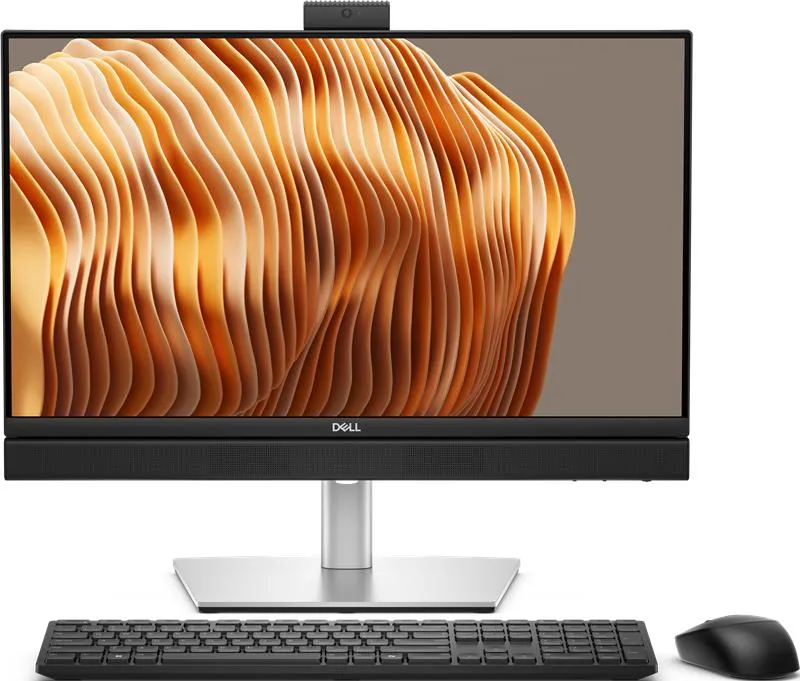
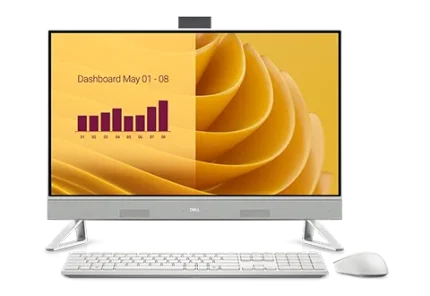
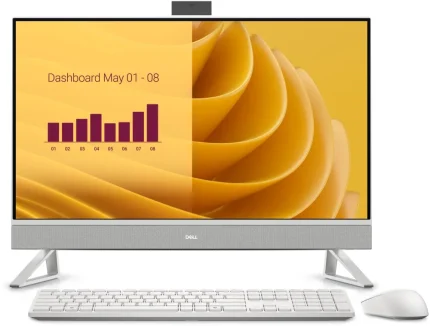
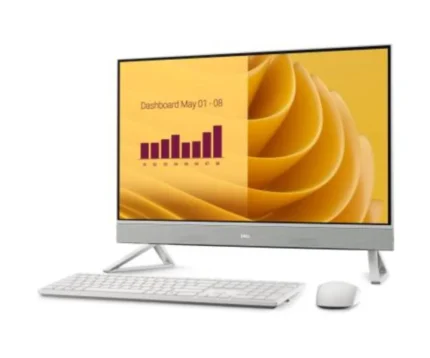
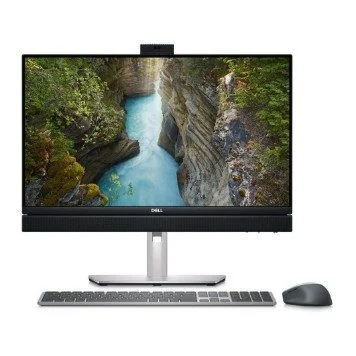
The QB24250 brings the desktop and its Full HD display into one unit, with a silver stand and the listed wireless keyboard and mouse keeping the workspace straightforward. The integrated camera, microphones and speakers cover the basics without a separate tower beside your desk.
Your configuration
Core Ultra 7 265 for the work ahead
This offer pairs the 20-core Intel Core Ultra 7 265 with 16GB of DDR5 memory and a 512GB PCIe SSD. Integrated Intel Graphics handles the display, while Windows 11 Pro provides the operating system. Turbo frequency is a conditional maximum, rather than a promise that every task runs at 5.3GHz.
Display and calls
A clear place for documents and conversation
The 23.81-inch IPS panel presents 1920×1080 resolution for documents, browser windows and meetings. The listed non-touch configuration supports refresh rates up to 100Hz. Raise the FHD camera for a call, then press it back into the housing when you want it concealed. Optional IR camera features are not assumed.
Connect your desk
Give each connection a clear role
Use Ethernet for a wired network or the listed Wi-Fi 6E connection where compatible infrastructure is available. USB-C and USB-A ports serve storage and peripherals. DisplayPort andHDMI-out connect external displays; the separate HDMI-in accepts another source for the built-in screen. The input selector beneath the display switches the source.
Room to service
Understand the upgrade path before you buy
Dell documents two DDR5 SoDIMM slots and two M.2 SSD slots for the QB24250. This listed memory population uses one 16GB module; the model supports up to 64GB as two 32GB modules. Match any upgrade to Dell supported configurations and check the actual drive mounting hardware, rather than assuming every optional part is fitted.
Long-term care
Keep support tied to the exact computer
The regional offer lists three years of Dell ProSupport. Keep the purchase documentation and Service Tag together so the installed hardware, software downloads and service entitlement can be checked for this unit. Dell model support provides manuals and access to software selection without relying on a fixed driver version.
Specifications
Product and supplied configuration
Brand
Dell
Model
Pro 24 All-in-One Plus QB24250
Regional order code
BTO103_QB24250_EMEA
Processor
Intel Core Ultra 7 265
Processor cores
20 cores
Maximum turbo clock
Up to 5.3GHz; workload, power and thermal conditions apply
Operating system
Windows 11 Pro
Graphics
Integrated Intel Graphics; shared system memory
Installed memory
16GB (1 × 16GB), DDR5, up to 5600MT/s
Installed storage
512GB M.2 PCIe solid-state drive
Keyboard and mouse
Dell Pro Wireless Keyboard and Mouse KM5221W, as listed for this offer; regional keyboard layout should be checked
Support term
3-year Dell ProSupport, as listed for this regional offer; entitlement, service availability and terms apply
Core layout
8 Performance-cores +12 Efficient-cores
Processor cache
30MB
NPU
Integrated NPU rated up to 13TOPS; theoretical manufacturer rating, not application performance
Display
Panel
23.81-inch (approximately 23.8-inch) Full HD IPS
Native resolution
1920 × 1080 pixels
Touch capability
Non-touch
Refresh rate
Up to 100Hz for this listed non-touch panel
Surface
Anti-glare
Display option boundary
Dell lists 250-nit non-touch and 300-nit touch options; do not assume optional touch features are included
Memory and storage expansion
Memory slots
Two DDR5 SoDIMM slots
Installed population
One 16GB module; second slot unpopulated according to listed1×16GB configuration
Maximum supported memory
64GB as 2×32GB DDR5-5600; supported configurations and speeds follow Dell manual
Module sizes
8GB, 16GB or 32GB per slot in Dell supported configurations
SSD slots
Two M.2 slots accepting 2230/2280 SSDs; actual installed drive form factor and mounting hardware should be checked before upgrades
Wireless slot
One M.2 2230 slot for Wi-Fi/Bluetooth module
Service precautions
Follow Dell service instructions; disconnect power and protect data/BitLocker recovery information before service
Connections and display routing
USB-C
Two USB 3.2 Gen 2x2 Type-C ports, up to 20Gbps each: one below display and one rear
USB-A
Four USB 3.2 Gen 2 Type-A ports, up to 10Gbps: one right-side with PowerShare and three rear
Additional USB-A
Two rear USB 3.2 Gen 1 ports, up to 5Gbps, with SmartPower On; USB wake depends on BIOS settings
DisplayPort output
One DisplayPort++ 1.4a HBR3/HDCP 2.3
HDMI output
One HDMI-out 2.1 TMDS4K/HDCP 2.3
HDMI input
One HDMI-in 1.4 FHD/HDCP 1.4; accepts an external source for the built-in display
Ethernet
One RJ45 Gigabit Ethernet port
Audio connection
One global headset jack
Card reader
SD-card 4.0 slot
Wireless
Wi-Fi 6E andBluetooth; compatible router, regional 6GHz availability and OS support required
Wireless module
Intel AX211, as listed in native configuration; Dell also offers other modules, not implied as supplied
Camera, audio and power
Camera
Retractable FHD camera, as stated in commercial title; FHD RGB option supports1920×1080 at 30fps
Camera privacy
Press the retractable module down until it clicks to conceal it
IR limitation
Optional5MP RGB+IR module is a separate configuration; no IR/WindowsHello face authentication is claimed here
Microphones
Integrated array microphones
Speakers
Integrated stereo speakers
Power supply
160W internal power supply, as listed; this is PSU capacity, not constant wall-power consumption
Battery
No operating battery; mains-powered desktop
Physical and installation
Computer body
540 ×57.90 ×354.30mm (W×D×H), excluding stand allowance
Stand changes overall height, depth andweight; allow ventilation, port access andworkspace clearance
Mount interface
100×100mm VESA screw pitch; verify compatible mounting hardware andload capacity
Security
3×7mm T-Bar security-cable slot; lock sold separately unless explicitly included
Model options are not automatically included. Confirm the regional keyboard layout, service entitlement and any essential panel or camera requirement before ordering. Performance, wireless availability and supported upgrades depend on configuration and operating conditions.
Driver & Software Downloads
Use official support resources for this product. Each link opens in a new tab.
Dell QB24250 — official manuals and support
Exact Dell Pro 24 All-in-One Plus QB24250 support resources. Select Drivers & Downloads and the supplied Service Tag/Windows 11 version for applicable software; confirm model and OS before downloading. No fixed driver or firmware version is promised.
No reviews yetBe the first to review this product.
Reviews
There are no reviews yet.
Be the first to review “Dell Pro 24 All-in-One Plus QB24250/U7 265/16GB/512GB SSD/23.81” FHD/Integrated/FHD Cam/Mic/WLAN + BT/Wireless Kb & Mouse/160W/W11Pro/ 3Y ProSpt”
Necessary cookies keep the site, cart, checkout, account, and security features working. With your permission, we also use optional analytics and advertising cookies to measure and improve our service. “Accept optional cookies” consents only to that optional processing; use of the site remains separately governed by our Terms. You can choose Necessary only and change your choice at any time.



Reviews
There are no reviews yet.