Top of pagePrimary navigation
Flash sale Limited-time prices and current MatzoTech offers Shop offers

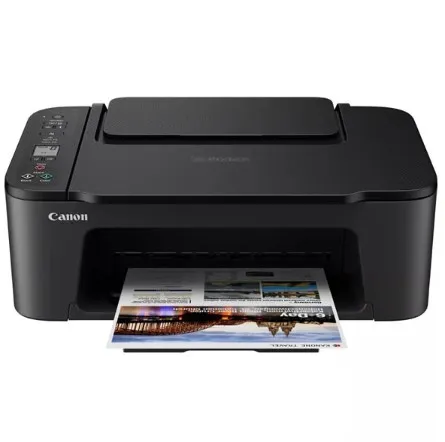
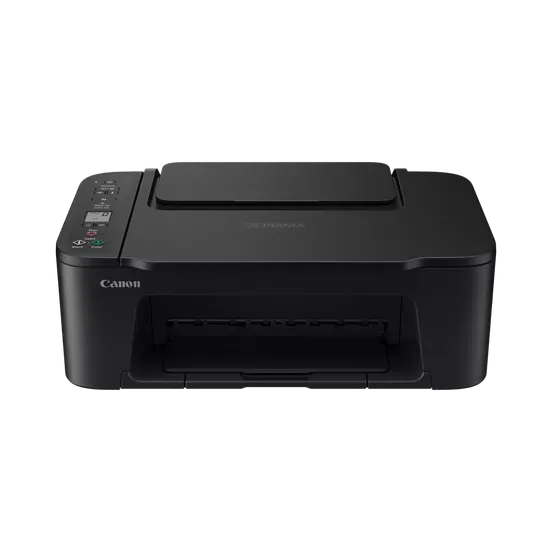
Canon Pixma TS3640 A4 Wireless 3-in-1 Inkjet Printer

0.0 No reviews yet Write a review
SKU: 6670C037AA
New Supplier has stock — 10 avail

Canon PIXMA TS3640 A4 Wi-Fi inkjet all-in-one for printing, copying and flatbed scanning, with Canon PRINT, AirPrint/Mopria support and FINE black/colour cartridges.

R999.00

VAT included · Secure checkout

Supplier has stock — 10 avail

Key product details

Full specifications below
  • Ean: 4549292234046
  • Gtin: 4549292234046
  • Brand: Canon
  • Condition: New
Add to wishlist

Delivery & support

Clear fulfilment, warranty and payment details.

  • Availability Supplier has stock — 10 avail Supplier has stock — 10 avail
  • Delivery Nationwide courier delivery or collection from Strand, Cape Town. Courier nationwide or Strand collection
  • Dispatch Ships within 24 hours. Ships within 24 hours
  • Warranty Manufacturer warranty applies where stated on the product page. As stated on this page
  • Returns See our Returns Policy for eligible change-of-mind and faulty goods procedures. See Returns Policy
  • Secure payment PayFast checkout with card, Instant EFT, and Mobicred. PayFast · card · EFT · Mobicred
Ask us a question

Canon • PIXMA TS3640 • Print, copy, scan

The everyday document. The favourite photo.

Print, copy and scan from one compact home printer. The Canon PIXMA TS3640 combines Wi-Fi connectivity with FINE cartridge printing, smartphone options and a flatbed scanner. Keep an occasional form, homework page or small photo within reach, with straightforward controls and a small mono LCD for status.

Canon Pixma TS3640 A4 Wireless 3-in-1 Inkjet Printer
3-in-1Print, copy, scan
Wi-FiMobile connections
7.7 /4.0ipmMono /colour
FlatbedA4 document scan

Everyday printing

Keep the essentials together.

The TS3640 brings document printing, copying and scanning into one A4 device. The supplied product listing specifies approximately 7.7ipm monochrome and 4.0ipm colour; actual speed depends on the document, settings and connection. FINE black and tri-colour cartridges serve everyday text and colour work without an assumed refillable-tank system.

Canon Pixma TS3640 A4 Wireless 3-in-1 Inkjet Printer — Keep the essentials together.

Mobile connection

Choose how the page reaches the printer.

Canon PRINT supports compatible phone and tablet workflows, with AirPrint for supported Apple devices and Mopria for supported Android devices. Wireless Direct/Access Point mode allows a direct device connection when appropriate. PIXMA Cloud Link uses the supported Canon application and service; internet and account requirements apply to cloud functions.

Scanning and copying

Use the platen for one original at a time.

The flatbed accepts originals up to 216 ×297mm, with 600 ×1200dpi optical sampling. Lay the document or photo on the glass and use the supported scanning workflow. This is a manually loaded flatbed setup, not an automatic document-feeder workflow. Windows driver instructions provide manual two-sided printing with a prompted paper reload; automatic duplex is not implied.

Paper handling

Match the stack to the sheet.

The rear tray holds approximately 60 sheets of suitable plain paper, reduced to 10 sheets for Legal. Plain-paper weights are 64–105g/m². Supported document sizes include A4, A5, B5, Letter and Legal, alongside selected small photo sizes and compatible Canon specialty papers. Photo and specialty-media stack limits vary; check the media instructions rather than applying the 60-sheet plain-paper limit to every stock.

Ink choices

Plan replacements around your pages.

Canon lists PG-445 black and CL-446 tri-colour cartridges for this model, with PG-445XL and CL-446XL alternatives. Standard cartridges are rated up to 180 A4 document pages each, compared with 400 black and 300 colour pages for XL. These are ISO/IEC 24711 continuous document-printing yields after setup; coverage, photos, cleaning and usage change actual yield. Replacement-cartridge yields do not establish the capacity of supplied setup inks.

Home installation

Leave room for trays and access.

With trays retracted, the printer measures approximately 435 ×327 ×145mm and weighs about 4kg with FINE cartridges installed. Allow extra room for paper feeding, the output tray and lifting the scanner cover. The 100–240V AC supply supports 50/60Hz; use the correct regional power cord and select the appropriate Canon software for the installed operating system.

Specifications

Functions and scanning

Model / supplier SKUPIXMA TS3640 /6670C037AA
FunctionsPrint, copy, scan; Wi-Fi and supported cloud/mobile workflows
Print technologyFINE cartridge inkjet; black and tri-colour cartridges
Listed document speedsApprox. 7.7ipm mono /4.0ipm colour; supplied listing, job and settings dependent
ScannerManually loaded flatbed; no ADF workflow
Maximum original size216 ×297mm; A4/Letter
Optical scan sampling600 ×1200dpi; manufacturer references ISO14473
Scan output8-bit grey; RGB8-bit per colour
Two-sided printingManual operation through supported Windows driver; user reload required

Paper handling

InputRear tray; approximately 60 sheets plain paper; Legal10 sheets
OutputApproximately10 sheets plain paper; remove printed sheets as appropriate
Plain-paper weight64–105g/m²
Document sizesA4, A5, B5, Letter, Legal; OS/media support conditions apply
Photo sizes10×15cm, 13×18cm, 89×127mm, 127×178mm and square5-inch among listed sizes
Photo loadingSupported4×6-inch media up to20 sheets; 5×7-inch/square5-inch up to 10; reduce if feeding marks occur
Specialty mediaSelected Canon photo stickers, restickable and magnetic media; typically1 sheet for listed specialty stocks

Consumables and yields

Standard black / colourPG-445 /CL-446
XL black / colourPG-445XL /CL-446XL
A4 document yieldsPG-445:up to 180pages; CL-446:up to 180pages; PG-445XL:up to400pages; CL-446XL:up to300pages
Yield conditionsISO/IEC 24711 continuous printing using replacement ink after setup; colour yield averaged across CMY; actual results vary substantially
Supplied inkConfirm included setup-cartridge capacity and regional package; replacement yield is not an in-box yield guarantee

Connectivity and software

InterfacesHi-Speed USB; Wi-Fi; USB and network can operate together
Wi-Fi standards802.11a/b/g/n; 2.4/5GHz band availability varies by country/region
Wireless setup / securityWPS /Easy wireless connect; WPA/WPA2/WPA3 options as supported
Mobile / cloudCanon PRINT, AirPrint, Mopria, PIXMA Cloud Link; device/app/service conditions apply
Windows listed in manualWindows 11, 10, 8.1, 7SP1; check supported current driver and OS requirements before setup
macOS listed in manualmacOS 10.15.7–14; verify support for other releases before installation
Other platformsiOS, iPadOS, Android, ChromeOS; feature availability varies
DisplaySmall monochrome LCD

Physical and power

Dimensions(W ×D ×H)Approx. 435 ×327 ×145mm, trays retracted
WeightApprox. 4kg with FINE cartridges installed
Power supplyAC100–240V, 50/60Hz; region-specific supplied cord
Copy / standby / off power≤9W copy; ≤1.0W minimum standby; ≤1.4W all ports connected; ≤0.2W off; manufacturer test conditions apply
Operating conditions5–35°C; 10–90%RH non-condensing
Recommended conditions15–30°C; 10–80%RH non-condensing
Installation clearanceAllow additional space for trays, rear paper feed and scanner-cover opening

Confirm the supplied regional cartridge and power-cord package. Choose the exact TS3640 model during software setup and check support for the installed OS release. Ink page yields refer to controlled document tests and vary with use.

Driver & Software Downloads

Use official support resources for this product. Each link opens in a new tab.

Canon TS3640 / TS3600-series online manual and setup

Official manual explicitly includes TS3640. Follow model, regional and operating-system selection for setup, software, paper handling and cartridge replacement.

Open official support (opens in a new tab)

No reviews yetBe the first to review this product.

Reviews

There are no reviews yet.

Be the first to review “Canon Pixma TS3640 A4 Wireless 3-in-1 Inkjet Printer”

Your email address will not be published. Required fields are marked *

Compare 2–5 products side by side

WhatsApp