
ASUS exact model software support
Official model support page. Select an operating system and review available software requirements before downloading.
Open official support (opens in a new tab)Checking which support options are available…
Who would you like help from?
Enter your name to begin your live chat with an online consultant.
What can we help you with?
Your details are used only to respond. MatzoBot requests are securely passed to the MatzoTech team.
Your request has been emailed to MatzoTech. A consultant will reply using the email address or mobile number you supplied.

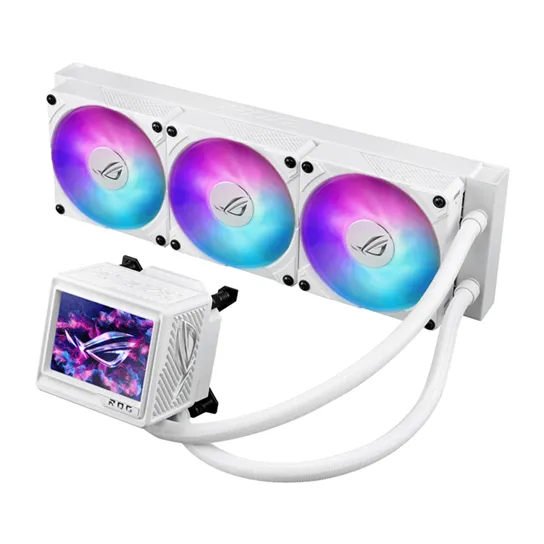
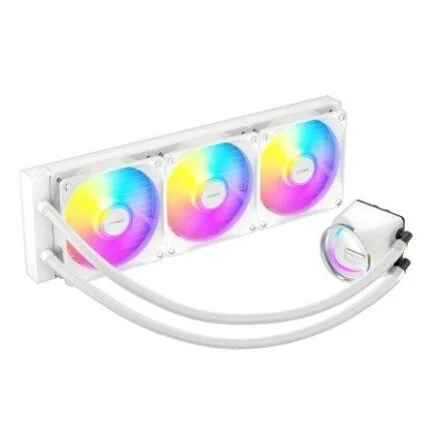
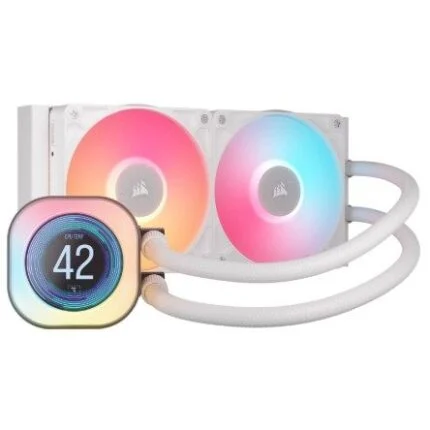
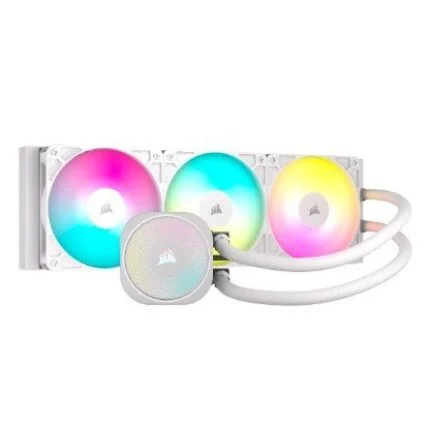
White 360 mm AIO CPU cooler with 3.5-inch IPS LCD, embedded VRM fan, magnetic ARGB fans and 400 mm sleeved tubes.
R7,369.00
Supplier has stock — 3 avail
Clear fulfilment, warranty and payment details.
Official manufacturer overview
ROG Global · Six-second ROG Ryujin III 360 ARGB Extreme family showcase. The film shows the black finish; this listing is the White Edition. Finish and regional package details differ; consult this product’s specifications.
Play to load this video from YouTube.
ASUS ROG • ROG Ryujin III 360 ARGB Extreme White Edition
The ROG Ryujin III 360 ARGB Extreme White Edition combines an Asetek Emma Gen8 V2 pump, a 3.5-inch IPS LCD and an embedded fan around the CPU block. Three 30 mm-thick magnetic ARGB radiator fans distinguish the Extreme model’s cooling hardware. Plan the radiator, CPU-block and cable clearances together before selecting the case.
Full-colour LCD
The 3.5-inch IPS LCD provides 480p resolution, a 60 Hz refresh rate and 24-bit colour. It can show monitoring information, custom GIFs, wallpapers and text. Giphy integration provides another source of visual content. Screen content and monitoring depend on the selected software and configuration.
Pump and CPU block
An Asetek Emma Gen8 V2 pump and copper CPU plate sit beneath the display. The 89 × 92 × 108 mm water-block assembly also contains an axial-tech fan that directs air around the CPU socket and VRM area. ASUS rates this embedded fan at 5100 RPM ±10%, 21.08 CFM and 5.53 mm H₂O; a temperature reduction is not guaranteed for every motherboard.
Extreme radiator fans
Three 120 × 120 × 30 mm ROG Magnetic Daisy-chainable ARGB fans snap together to carry control signals and power through one cable route. Their three-phase six-pole motors, fluid dynamic bearings and nine-blade design are distinct parts of the Extreme fan assembly. Each is specified at 0–2800 RPM ±10%, 89.73 CFM and 5.15 mm H₂O, with PWM/DC control.
Radiator and clearance
The aluminium radiator measures 399.5 × 120 × 30 mm and connects through 400 mm sleeved rubber tubes. The 30 mm fans add depth before fasteners and clearance are allowed for. Check the selected mounting position against memory, motherboard heatsinks and the tube route. The 36 dB(A) rating applies to the radiator fan specification rather than the complete computer.
Sockets and connections
Intel LGA1851, LGA1700, LGA1200 and LGA115x, plus AMD AM5 and AM4, are listed by ASUS. Match the supplied bracket and backplate to the socket and follow the installation guide. Socket support does not establish clearance around a particular motherboard or guarantee fit in every case. The Extreme quick-start guide shows a 9-pin internal USB 2.0 connection, a 4-pin pump cable to CPU_FAN, AIO_PUMP or W_PUMP+, and separate motherboard fan and addressable-lighting connections. Follow the supplied guide and motherboard header limits.
Software control
ASUS documents Armoury Crate display control and an AIDA64 Extreme custom-display workflow. When both applications are installed, ASUS instructs users to turn Armoury Crate display control off before assigning that role to AIDA64. The product page lists a one-year AIDA64 Extreme subscription; activation and offer terms apply. Confirm supported operating systems and available software on the exact support page.
Package and warranty
The box includes one CPU liquid cooler with pre-applied thermal compound, three ARGB radiator fans, male and female daisy-chain fan cables, screws and mounting brackets, a ROG VIP card, ROG sticker and quick-start guide. ASUS lists a six-year warranty for this model, subject to applicable regional terms and proof of purchase.
| Model | ROG Ryujin III 360 ARGB Extreme White Edition |
|---|---|
| Supplier SKU | ROGRYUJINIII-360-EXT WH |
| Colour | White |
| Type | All-in-one CPU liquid cooler; 360 mm radiator fan format |
| GTIN | 4711387789957 |
| Pump | Asetek Emma Gen8 V2 |
|---|---|
| CPU plate | Copper |
| Block dimensions | 89 × 92 × 108 mm |
| Intel sockets | LGA1851, LGA1700, LGA1200, LGA115x |
| AMD sockets | AM5, AM4 |
| Thermal compound | Pre-applied |
| Fit qualification | Check actual case/radiator, block, memory, tube and motherboard clearances |
| Radiator dimensions | 399.5 × 120 × 30 mm |
|---|---|
| Radiator material | Aluminium |
| Tube length | 400 mm |
| Tube construction | Sleeved rubber |
| Fan thickness to allow | 30 mm |
| Included | 3 × ROG Magnetic Daisy-chainable ARGB fans |
|---|---|
| Each fan dimensions | 120 × 120 × 30 mm |
| Speed | 0–2800 RPM ±10% |
| Airflow | 89.73 CFM |
| Static pressure | 5.15 mm H₂O |
| Noise | 36 dB(A), manufacturer fan rating; not whole-system noise |
| Control | PWM/DC |
| Lighting | ARGB; Aura Sync |
| Cable arrangement | Magnetic daisy-chain |
| Display | 3.5-inch IPS LCD; 480p; 60 Hz; 24-bit colour |
|---|---|
| Content | Hardware monitoring, custom images/GIFs and wallpapers |
| Software | Armoury Crate / AIDA64 Extreme custom-display workflow |
| OS selection | Confirm current supported OS and available packages on exact model support page |
| Contents | 1 × cooler with pre-applied compound, 3 × radiator fans, male/female daisy-chain fan cables, VIP card, ROG sticker, quick-start guide and screws/brackets |
|---|---|
| Manufacturer warranty | 6 years; regional terms apply |
| Embedded fan speed | 5100 RPM ±10% |
|---|---|
| Embedded fan airflow | 21.08 CFM |
| Embedded fan pressure | 5.53 mm H₂O |
| USB | 9-pin internal USB 2.0 |
| Pump header | 4-pin CPU_FAN / AIO_PUMP / W_PUMP+ as directed in guide |
| Fan / ARGB | Separate motherboard fan and addressable-lighting connections; follow guide limits |
| Subscription | Product page lists 1-year AIDA64 Extreme; activation/offer terms apply |
Confirm the case, mounting position, motherboard connections and software operating system before ordering.
Use official support resources for this product. Each link opens in a new tab.
Official model support page. Select an operating system and review available software requirements before downloading.
Open official support (opens in a new tab)Official manual selector. Check mounting instructions, header connections and the applicable revision before installation.
Open official support (opens in a new tab)Official Extreme-series installation PDF, including internal USB, pump, fan and lighting connections. Check supplied hardware revision for your unit.
Open official support (opens in a new tab)Compare 2–5 products side by side
Help other shoppers by sharing an honest review.
Write a reviewYou are offline. Reconnect to check prices and shop.
Reviews
There are no reviews yet.