
Archer BE230 setup guide
TP-Link South Africa’s exact-model wiring and setup guide. Includes Tether for iOS or Android and browser configuration. This link opens documentation.
Open official support (opens in a new tab)Checking which support options are available…
Who would you like help from?
Enter your name to begin your live chat with an online consultant.
What can we help you with?
Your details are used only to respond. MatzoBot requests are securely passed to the MatzoTech team.
Your request has been emailed to MatzoTech. A consultant will reply using the email address or mobile number you supplied.

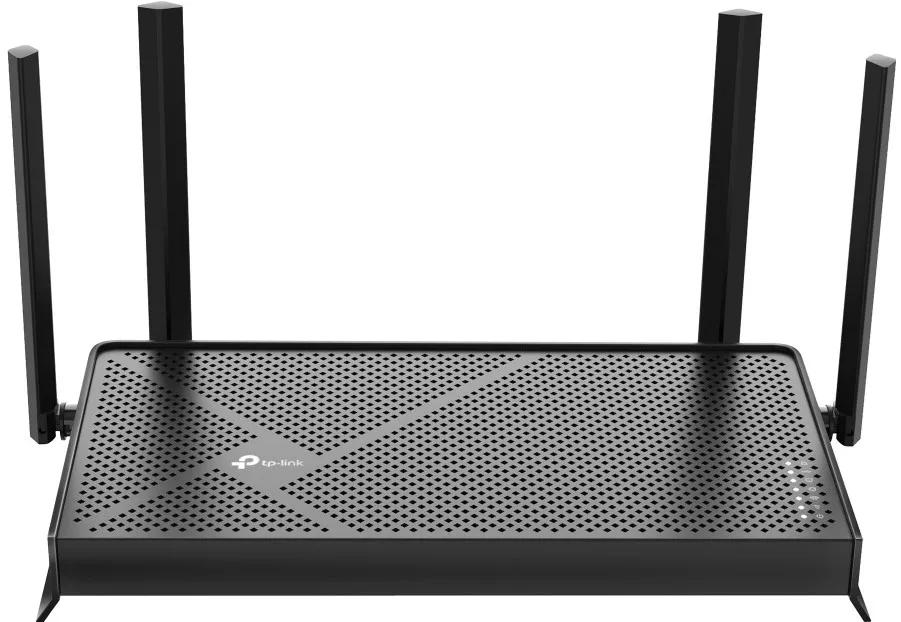
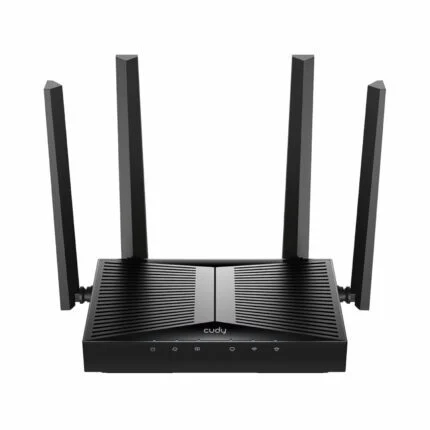
TP-Link Archer BE230 BE3600 dual-band Wi-Fi 7 router with separate 2.5 Gbps WAN and LAN ports, three Gigabit LAN ports and EasyMesh compatibility.
R2,099.00
Supplier has stock — 1 avail
Clear fulfilment, warranty and payment details.
Official manufacturer overview
TP-Link Global Support · This TP-Link dual-band Wi-Fi 7 router family setup guide demonstrates the Archer BE230. Follow the labels and hardware version on your router.
Play to load this video from YouTube.
Archer BE230 | Dual-band Wi-Fi 7
Connect a multi-gigabit internet service to the 2.5 Gbps WAN port and use the separate 2.5 Gbps LAN port for a compatible computer or switch. On Wi-Fi, the BE230 gives your devices two bands to work with, including 5 GHz for compatible Wi-Fi 7 clients.
Wired layout
Use the dedicated 2.5 Gbps WAN port for the incoming connection and the 2.5 Gbps LAN port for the wired device that needs it most. Three additional Gigabit LAN ports serve equipment such as a TV, console or smart-home hub. Link speeds depend on the equipment and cabling at both ends.
Wireless and mesh
The BE230 uses 2.4 GHz and 5 GHz. Compatible Wi-Fi 7 devices can use Multi-Link Operation across those bands. If one router cannot reach every room, add compatible EasyMesh equipment and check firmware support before choosing a node.
Network controls
Use TP-Link Tether on iOS or Android, or the web management interface. Create a guest network, manage connected devices and, when needed, configure the documented VPN client or server options. Some HomeShield tools require a paid plan.
Local sharing
The rear USB 3.0 port can share files or media from a compatible storage device. TP-Link lists Samba file sharing, FTP and a media server. The port is separate from the Ethernet connections.
| Brand | TP-Link |
|---|---|
| Model | Archer BE230 |
| Wireless class | BE3600 dual-band Wi-Fi 7 |
| Operating modes | Router or access point |
| Bands | 2.4 GHz and 5 GHz |
|---|---|
| Advertised 5 GHz link rate | Up to 2,882 Mbps (802.11be) |
| Advertised 2.4 GHz link rate | Up to 688 Mbps (802.11ax) |
| Antennas | Four external antennas with beamforming |
| Multi-Link Operation | Supported with compatible clients |
| Mesh | EasyMesh compatible with matching equipment and firmware |
| WAN | 1 × 2.5 Gbps Ethernet |
|---|---|
| LAN | 1 × 2.5 Gbps and 3 × 1 Gbps Ethernet |
| USB | 1 × USB 3.0 |
| USB filesystem support | NTFS, exFAT, HFS+ and FAT32 |
| USB sharing | Samba, FTP and media server |
| Power input | 12 V DC, 2 A |
| Controls | Power, wireless on/off, LED, WPS and reset |
| Management interface | TP-Link Tether for iOS and Android or web browser |
|---|---|
| IP protocols | IPv4 and IPv6 |
| WAN connection types | Dynamic IP, static IP, PPPoE, PPTP and L2TP |
| Wireless security | WPA, WPA2, WPA3 and WPA/WPA2-Enterprise (802.1X) |
| Guest Wi-Fi | One network per band |
| VPN client and server | OpenVPN, WireGuard, L2TP and PPTP as documented by TP-Link |
| Traffic control | QoS by device |
| Parental controls | HomeShield, with some features subject to a paid plan |
| Operating temperature | 0 to 40 °C |
|---|---|
| Operating humidity | 10% to 90% relative humidity, non-condensing |
| Documented package contents | Router, power adapter, Ethernet cable and setup documentation |
Wireless figures are maximum link rates. Real throughput depends on your client, settings, interference and internet plan. Read the hardware version and region on the device label before selecting any firmware.
Use official support resources for this product. Each link opens in a new tab.
TP-Link South Africa’s exact-model wiring and setup guide. Includes Tether for iOS or Android and browser configuration. This link opens documentation.
Open official support (opens in a new tab)Help other shoppers by sharing an honest review.
Write a reviewYou are offline. Reconnect to check prices and shop.
Reviews
There are no reviews yet.