
Lexmark CS632dwe South Africa support
Open Support or Drivers & Downloads from the exact 50M0076 product page, then select your operating system.
Open official support (opens in a new tab)Checking which support options are available…
Who would you like help from?
Enter your name to begin your live chat with an online consultant.
What can we help you with?
Your details are used only to respond. MatzoBot requests are securely passed to the MatzoTech team.
Your request has been emailed to MatzoTech. A consultant will reply using the email address or mobile number you supplied.

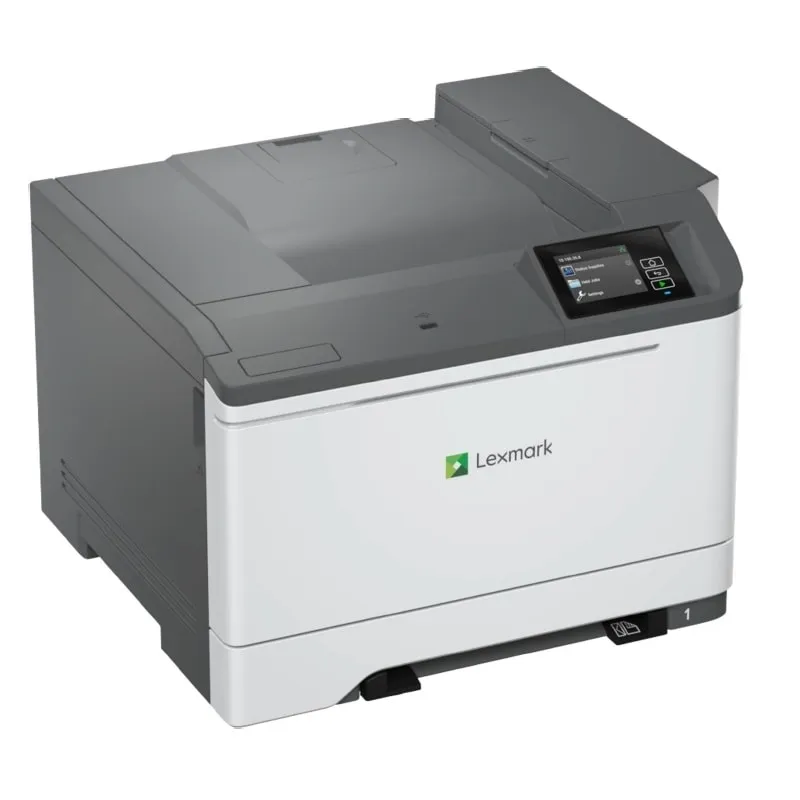
Lexmark CS632dwe 50M0076 colour laser printer with automatic duplex, up to 40 ppm A4, Wi-Fi and a colour touchscreen.
R14,009.00
Supplier has stock — 1 avail
Clear fulfilment, warranty and payment details.
Official manufacturer overview
Lexmark How-to Videos · Lexmark demonstrates how to replace a toner cartridge on the CS632 family and related printers. Follow the regional supply codes for this CS632dwe.
Play to load this video from YouTube.
LEXMARK CS632DWE · SOUTH AFRICA
The Lexmark CS632dwe is a print-only colour laser printer with automatic two-sided printing, Wi-Fi, Gigabit Ethernet and a 10.9 cm colour touchscreen. The South African 50M0076 model is rated for up to 40 A4 pages per minute in black or colour.
Connect over Wi-Fi or Gigabit Ethernet, or print over USB. Automatic duplex handles two-sided A4 documents. Lexmark rates first print as fast as 6.5 seconds in black and 6.7 seconds in colour under its test conditions.
PAPER
A 250-sheet standard tray takes common office media and a single-sheet multipurpose feeder handles an individual sheet. Check Lexmark’s media guide before choosing labels, card stock or envelopes. Optional input trays expand the paper supply.
TONER
The printer ships with a 3,000-page black Return Programme toner and 2,000-page colour Return Programme toners. Replacement choices vary by region and capacity class. Match the South African device before ordering.
CONTROL
The e-Task display provides access to job settings and supply status. Direct USB is available from the front port. Additional storage is optional and should be selected for the specific installation.
| Model / regional part | Lexmark CS632dwe / 50M0076 |
|---|---|
| Functions | Colour laser printing |
| Rated print speed (ISO/IEC 24734, A4) | Up to 40 ppm black or colour, simplex; up to 20 sheets/min black or colour, duplex |
| First page out | As fast as 6.5 s black or 6.7 s colour |
| Print resolution | 1200 × 1200 dpi black and colour; 4800 Color Quality mode |
| Duplex | Integrated automatic two-sided printing |
| Touchscreen | 10.9 cm / 4.3-inch e-Task colour |
| Processor and memory | 1 GHz dual-core; 1024 MB |
| Storage | Optional Intelligent Storage Drive or magnetic hard disk |
| Standard input | 250-sheet tray plus single-sheet multipurpose feeder (75 gsm bond) |
|---|---|
| Output | Up to 170 sheets of 75 gsm bond |
| Input with optional trays | Up to 2,001 sheets of 75 gsm bond |
| Media examples | A4, A5, A6, Letter, Legal, plain paper, selected envelopes, card stock and paper/vinyl labels; check the Lexmark media guide |
| Weight range | 60–220 gsm standard tray; 60–176 gsm multipurpose feeder |
| Recommended monthly volume | 1,500–10,000 pages |
| In-box Return Programme toner | Up to 3,000 black pages and 2,000 colour pages (CMY composite) |
|---|---|
| Listed max. replacement toner yield | Up to 20,000 black pages and 11,700 colour pages (CMY composite) |
| Yield test | ISO/IEC 19798 standard pages in continuous simplex printing; actual yield varies |
| Regional supplies | Use Lexmark’s region-specific replacement list for the device; 75M50K0 black and 75M50C0 cyan, 75M50M0 magenta and 75M50Y0 yellow Return Programme examples |
| Interfaces | Gigabit Ethernet, Wi-Fi 802.11a/b/g/n/ac, front/rear USB-A and USB-B host connection |
|---|---|
| Direct USB | Front USB-A port |
| Software support | Select Windows or supported Linux versions using Lexmark’s regional support. Apple printing through AirPrint, Android printing through Mopria where available. |
| Dimensions (H × W × D) | 318.3 × 455 × 422.5 mm |
| Weight | 20.55 kg |
| Cables | USB and Ethernet cables are not included per Lexmark’s regional listing |
Use official support resources for this product. Each link opens in a new tab.
Open Support or Drivers & Downloads from the exact 50M0076 product page, then select your operating system.
Open official support (opens in a new tab)Official English interactive guide including CS632 setup, paper handling and supply replacement.
Open official support (opens in a new tab)Help other shoppers by sharing an honest review.
Write a reviewYou are offline. Reconnect to check prices and shop.

Reviews
There are no reviews yet.