
CONNECTION
Use existing Ethernet cabling
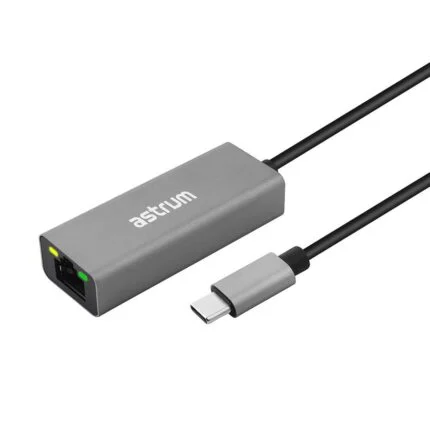
Connect the USB-C plug to a compatible data port and plug a Gigabit-capable Ethernet cable into the RJ45 socket. The host, network and cabling determine the speed you see.
Checking which support options are available…
Who would you like help from?
Enter your name to begin your live chat with an online consultant.
What can we help you with?
Your details are used only to respond. MatzoBot requests are securely passed to the MatzoTech team.
Your request has been emailed to MatzoTech. A consultant will reply using the email address or mobile number you supplied.

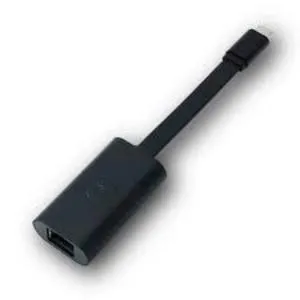
Dell 470-ABND connects a suitable USB-C host to Gigabit Ethernet. Dell documents PXE use on selected Latitude laptops.
R759.00
Supplier has stock — 1 avail
Clear fulfilment, warranty and payment details.
DELL USB-C TO GIGABIT ETHERNET
Connect an Ethernet cable to a compatible USB-C laptop with the Dell 470-ABND. It provides a Gigabit Ethernet connection for a desk, meeting room or deployment bench.
CONNECTION
Connect the USB-C plug to a compatible data port and plug a Gigabit-capable Ethernet cable into the RJ45 socket. The host, network and cabling determine the speed you see.
DEPLOYMENT
Dell names 470-ABND in its operating system deployment guidance for selected Latitude laptops. Network boot depends on the host model and its UEFI configuration.
SUPPORT
Use the Dell support information for your actual computer and operating system when checking the network driver and any model-specific boot options.
Verify USB-C data and PXE support against the specific laptop service documentation where required.
| Dell order code | 470-ABND |
|---|---|
| Host connector | USB-C male |
| Network connector | RJ45 female |
| Maximum Ethernet link | 1 Gb/s on a compatible link |
| PXE network boot | Documented by Dell for selected Latitude laptops and their supported UEFI configurations |
|---|---|
| Driver support | Check Dell support for the host model and operating system |
Verify USB-C data and PXE support against the specific laptop service documentation where required.
Help other shoppers by sharing an honest review.
Write a reviewYou are offline. Reconnect to check prices and shop.

Reviews
There are no reviews yet.