

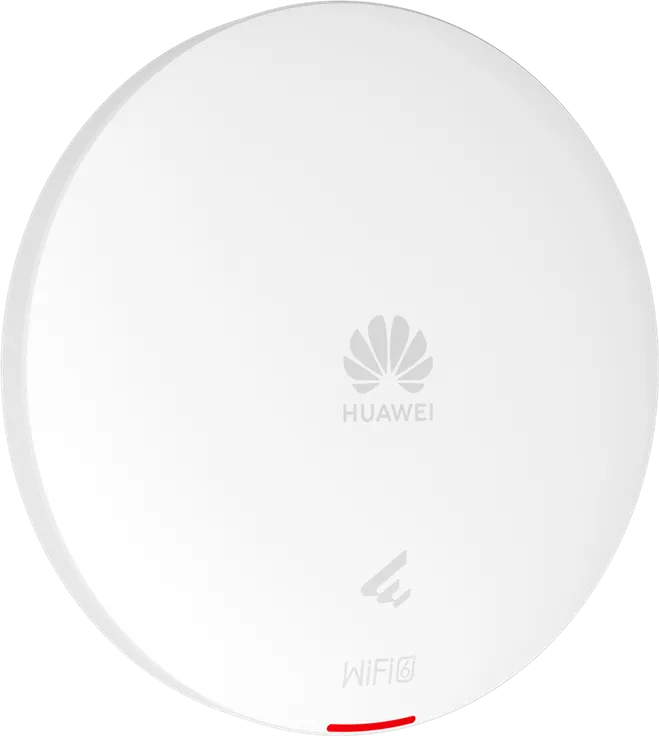
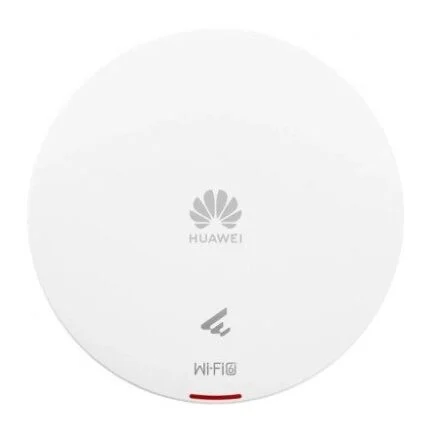
AP362 Wi-Fi 6 indoor Dual Radio(2.4G/5GHz) 2*2/2*2 MU-MIMO 1*GE Base-T internal smart antennas
Huawei eKit AP362, part 50085706: indoor Wi-Fi 6 access point with dual-band 2×2 MIMO, internal smart antennas, 1× Gigabit Ethernet and 802.3af PoE or 12 V DC power.
R2,339.00
Supplier has stock — 10 avail
Key product details
Full specifications below- Upc: 50085706
- Gtin: 50085706
Delivery & support
Clear fulfilment, warranty and payment details.
- Availability Supplier has stock — 10 avail Supplier has stock — 10 avail
- Delivery Nationwide courier delivery or collection from Strand, Cape Town. Courier nationwide or Strand collection
- Dispatch Backorder — usually dispatched in 2–3 working days after payment verification, subject to supplier confirmation. Backorder — usually dispatched in 2–3 working days after payment verification, subject to supplier confirmation.
- Warranty Manufacturer warranty applies where stated on the product page. As stated on this page
- Returns See our Returns Policy for eligible change-of-mind and faulty goods procedures. See Returns Policy
- Secure payment PayFast checkout with card, Instant EFT, and Mobicred. PayFast · card · EFT · Mobicred
Huawei eKit AP362 · Indoor Wi-Fi 6
Two Wi-Fi bands. One compact indoor access point.
The Huawei eKit AP362 combines 2.4 GHz and 5 GHz radios with 2×2 MIMO on each band, built-in smart antennas and a single Gigabit Ethernet connection. Its compact round enclosure supports wall or ceiling installation, with 802.3af PoE or a compatible 12 V DC supply.
The wireless design
Two radios, with two streams on each
AP362 brings Wi-Fi 6 to both the 2.4 GHz and 5 GHz bands. Each radio uses a 2×2 MIMO arrangement, retaining the built-in smart-antenna design in a compact indoor enclosure. Client capabilities and the network configuration determine which supported band, channel width and connection mode can be used.
Rate and uplink
Read the radio rate alongside the wired connection
Huawei lists a combined device-rate reference of 2.975 Gbps. This is a wireless physical-link specification across the radios, rather than measured application or internet throughput for one device. The AP’s single RJ45 port negotiates 10, 100 or 1000 Mbit/s; the wired connection and wider network also shape usable performance.
Power planning
Choose PoE or the correct DC source
The AP362 accepts IEEE 802.3af Power over Ethernet (PoE) or 12 V DC with a ±10% input tolerance. Huawei lists maximum device consumption of 11.2 W. Match the power source and installation to the exact device, and confirm whether a power adapter or injector is included in the supplied package before planning the purchase.
Room and placement
A low-profile enclosure for wall or ceiling mounting
The round body measures 180 mm across and 35 mm deep, with a manufacturer device weight of 0.46 kg. Wall and ceiling mounting are listed installation types. Choose the correct mounting hardware and surface, allow access for the Ethernet cable and power connection, and plan placement around the building and intended client locations.
Users and workloads
Plan for the workload behind the user count
Huawei recommends 80 access users and lists a maximum of 256. These are planning references, not a guarantee of equal application performance for every connected client. Account for concurrent traffic, client radio capabilities, interference and the wired network when choosing the number and placement of access points.
Deployment choices
Match management and channel settings to the installation
Confirm the intended management mode, software revision and any controller or service requirements for the supplied AP362 before deployment. The hardware channel-width references are up to 40 MHz on 2.4 GHz and 160 MHz on 5 GHz. Use channel and transmit-power settings permitted for the device’s operating region, with compatible client support.
Specifications
Identity and wireless radios
| Manufacturer / range | Huawei / eKit |
|---|---|
| Exact model | AP362 |
| Manufacturer part number | 50085706 |
| Device role | Indoor wireless access point |
| Wi-Fi generation | Wi-Fi 6 / IEEE 802.11ax |
| Operating bands | 2.4 GHz and 5 GHz |
| Radio count | 2 |
| MIMO / spatial streams | 2×2 on 2.4 GHz; 2×2 on 5 GHz |
| 2.4 GHz standards | IEEE 802.11b/g/n/ax |
| 5 GHz standards | IEEE 802.11a/n/ac/ac Wave 2/ax |
| Antenna design | Built-in smart antennas |
| Multi-user radio feature | MU-MIMO |
Rates, channels and clients
| Combined device-rate reference | 2.975 Gbps, manufacturer physical-link reference across the radios |
|---|---|
| Rate qualification | Client capabilities, channel conditions, configuration and network path affect actual throughput |
| 2.4 GHz maximum channel width | 40 MHz, where permitted and supported |
| 5 GHz maximum channel width | 160 MHz, where permitted and supported |
| Recommended access users | 80, manufacturer planning reference |
| Maximum access users | 256, manufacturer limit; not an application-throughput guarantee |
| Maximum transmit-power reference | 17 dBm per chain / 20 dBm combined per radio on both bands; regional configuration restrictions apply |
| 2.4 GHz antenna gain | 4 dBi per chain peak / 2 dBi combined, manufacturer reference |
| 5 GHz antenna gain | 5 dBi per chain peak / 3 dBi combined, manufacturer reference |
Wired connection and power
| Ethernet port | 1× GE RJ45 |
|---|---|
| Ethernet negotiation | 10/100/1000 Mbit/s auto-sensing |
| PoE input | IEEE 802.3af |
| DC input | 12 V ±10% |
| Maximum device power consumption | 11.2 W, manufacturer reference |
| Supplied power equipment | Confirm local adapter or PoE-injector inclusion; no included supply assumed |
Physical fit and environment
| Installation types | Wall or ceiling |
|---|---|
| Device dimensions | 180 mm diameter × 35 mm depth |
| Device weight | 0.46 kg, excluding packaging |
| Packaged dimensions | 200 × 231 × 52 mm, manufacturer reference |
| Packaged weight | 0.80 kg, manufacturer reference |
| Operating temperature | −10°C to +50°C, with altitude derating |
| Altitude temperature qualification | From 1800 m to 5000 m, maximum temperature decreases by 1°C per additional 300 m |
| Operating relative humidity | 5%–95% RH, non-condensing |
| Mounting and cable planning | Match surface and mounting hardware; allow access for Ethernet and power |
Deployment checks
| Operating region | Use the correct country/region settings and permitted channels/power for the supplied device |
|---|---|
| Management and software | Confirm exact AP362 software revision, operating mode and controller/service compatibility before deployment |
| Package and warranty | Exact local package, mounting accessories and warranty entitlement require confirmation; no new duration stated |



Reviews
There are no reviews yet.